シーン グラフを照会する
このトピックでは、Maya のシーン エレメント構成の基本について説明します。
無閉路有向グラフ(DAG)
Maya のシーン グラフは、通常は「無閉路有向グラフ」または DAG と呼ばれます。DAG は、実際には、シェーダ、デフォーマ、コンストレイントなど、非常に多様なノード タイプを含む、ディペンデンシー グラフ**と呼ばれるかなり大きなグラフのサブセットです。詳細については、次のセクション「ディペンデンシーグラフ プラグインの基本」を参照してください。ここでは、2 つの方法のいずれかで分類できる DAG ノードにフォーカスします。
- トランスフォーム ノード(
MFn.kTransform): このノード タイプは、下階層にあるすべてのオブジェクトに影響するローカルの 4x4 変換行列を定義します。この変換データは、MFnTransform関数セットによって操作します。トランスフォーム ノードは、シーン エレメントをグループ化する目的で他のトランスフォーム ノードを子として持つことができます。 - シェイプ ノード(
MFn.kMesh、MFn.kCamera、MFn.kLight... ): このノード タイプには、メッシュの頂点など、シーン エレメントの実際のジオメトリ情報が含まれます。シェイプ ノードは、常にトランスフォーム ノードを親として持ちます。
次の図は、基本的なシーンの簡素化された無閉路有向グラフ(DAG)を表します。world ノードは、シーンのルートを表します。緑色の円は、トランスフォーム ノード(kTransform)に対応しており、シーン内のシェイプの位置決めが可能です。シェイプ ノードは、青色の円で示されます。この DAG では、perspShape はシーン内のカメラ、pCubeShape1 はシーン内のキュービック メッシュ、pointLightShape1 はシーン内のポイント ライトをそれぞれ表します。pointLight1 トランスフォーム ノードは、pCube1 トランスフォーム ノードの子です。つまり、pCube1 トランスフォーム ノードが移動された場合には、ポイント ライトも移動します。
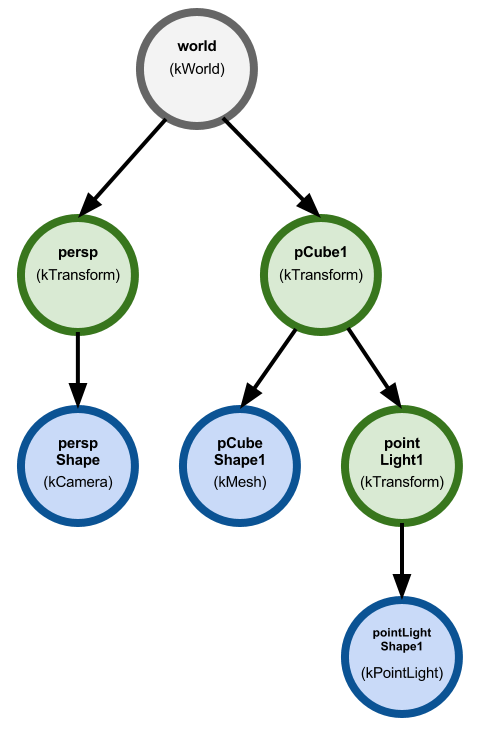
注: 通常、シェイプ ノードはその下に子を持つことはできません。この規則の例外は、underworld と呼ばれる特別な状況です。underworld は、そのルートがシェイプ ノードの子としてアタッチされる DAG サブグラフです。この underworld グラフは、NURBS カーブや NURBS サーフェスのコントロール ポイントおよび依存関係を定義します。
DAG パス
DAG 内の特定のシーン エレメントの位置は、MDagPath オブジェクトによって指定されます。
MDagPath は、MDagPath.node() を使用して DAG で対応する MObject を返すことができます。パス自体を拡張してシェイプ ノード(MDagPath.extendToShape())を含めるか、最も低いトランスフォーム ノード(MDagPath.transform())を返していくつかの便利な関数を指定することができます。MDagPath.fullPathName() 関数は、指定されたノードまでの DAG パスの文字列表現を返します。文字列表現は、DAG の名前のないルートから始まる、ノード名をパイプ(「|」)で区切ったシーケンスとしての書式をとります。上の図では、ルート world ノードから pointLightShape1 までのパスの文字列表現は、「|pCube1|pointLight1|pointLightShape1」のようになります(ルート ノードに名前がないことに注目してください)。
メモリの消費を減らすために、密度が特別に高いメッシュなど、複雑なシェイプをシーン グラフの複数の場所でインスタンス化できます。つまり、コピーすることなく、同じシェイプがシェイプの複数の位置にくるようにできます。これを実現するために、DAG 内の複数のトランスフォーム ノードを同じシェイプ ノードの親にすることができます。そのようにして、1 つのシェイプ ノードに DAG のルートからの複数のパスを持たせることができます。インスタンス化されたシェイプ ノードを特定するために、MDagPath.isInstanced() および MDagPath.instanceNumber() などの関数を使用できます。
シーン グラフのトラバース
シーン グラフは、MItDag オブジェクトを使用してトラバースできます。DAG はディペンデンシー グラフのサブセットであるため、必要に応じて MItDependencyGraph オブジェクトを使用できます。
先頭に MIt が追加されたクラスはイテレータと呼ばれ、コレクション内の各オブジェクトを検査する目的で使用できます。この例では、MItDag によってシーン内の DAG ノードを反復できます。以下のサンプル コードでは、DAG イテレータを作成します。このイテレータが、ルートからシーンのトラバースを開始して、深さ優先で各ノードに移動します。OpenMaya.MFn.kInvalid パラメータにより、MItDag オブジェクトがどのノード タイプもフィルタしなくなります。
dagIterator = OpenMaya.MItDag( OpenMaya.MItDag.kDepthFirst, OpenMaya.MFn.kInvalid )

# This reference to the MFnDagNode function set will be needed
# to obtain information about the DAG objects.
dagNodeFn = OpenMaya.MFnDagNode()
MItDag.isDone() 関数により、検査すべきオブジェクトが残っているかどうかを判別します。MItDag.currentItem() 関数は、イテレータの現在の DAG オブジェクトを返します。この DAG オブジェクトのルートからの相対的な深度は、MItDag.depth() を使用して取得できます。MItDag.next() を呼び出すと、イテレータの内部状態が次の項目に進みますが、DAG オブジェクトは返しません。これを唯一達成できるのは、MItDag.currentItem() を使用する方法です。これ以上反復を続ける項目がない場合には、MItDag.isDone() 関数によって True が返されます。したがって、シーン グラフをトラバースする簡易な while ループを作成できます。
# Traverse the scene.
while( not dagIterator.isDone() ):

    # Obtain the current item.
    dagObject = dagIterator.currentItem()

    # Extract the depth of the DAG object.
    depth = dagIterator.depth()

    # Make our MFnDagNode function set operate on the current DAG object.
    dagNodeFn.setObject( dagObject )

    # Extract the DAG object's name.
    name = dagNodeFn.name()

    print name + ' (' + dagObject.apiTypeStr() + ') depth: ' + str( depth )

    # Iterate to the next item.
    dagIterator.next()
注: 関数セット(例:
MFnDagNode)を使用する方法については、「オブジェクトの作成と操作」を参照してください。
選択したシーン エレメントの検査
Maya のユーザ インタフェース(またはスクリプト)を使用してオブジェクトを選択すると、オブジェクトがグローバル アクティブ セレクション リストに追加され、MGlobal.getActiveSelectionList() を使用してアクセスできるようになります。スタティック クラス MGlobal は、Maya アプリケーション、ロギング、オブジェクト選択、コマンド実行、3D ビュー(シーンのアップ軸を含む)、およびモデル操作に関する各種の関数を含んでいます。
以下のコードは、MSelectionList オブジェクトを投入することによって、アクティブ セレクション リストを取得する方法を例示しています。
Python API 2.0:
selectionList = OpenMaya.MGlobal.getActiveSelectionList()Python API 1.0:
selectionList = OpenMaya.MSelectionList()
OpenMaya.MGlobal.getActiveSelectionList( selectionList )この例では、MItSelectionList のインスタンスを使用してセレクション リストを反復します。MItSelectionList のコンストラクタを使用してフィルタを指定することにより、特定のタイプのオブジェクトを反復できます。以下の例では、MFn.kDagNode パラメータを指定します。それにより、この例のイテレータは、MFnDagNode 関数と互換性があるオブジェクトに対してフィルタを実行します。
iterator = OpenMaya.MItSelectionList( selectionList, OpenMaya.MFn.kDagNode )Python API 2.0 で、選択リストを使用して、シーン内のすべてのノードを最初に選択し、各項目のイテレータに getDagPath() を呼び出すことによって、シーン グラフ全体を繰り返し処理することができます。たとえば、次のようになります。
dagNodeFn = OpenMaya.MFnDagNode()

cmds.select(all=True)
selectionList = OpenMaya.MGlobal.getActiveSelectionList()
if sList.length()>0:
    iterator = OpenMaya.MItSelectionList(selectionList, OpenMaya.MFn.kDagNode)
    while not iterator.isDone():
        print iterator.getDagPath()
        iterator.next()
プラグイン コマンドの例: DAG パスを出力する
ファイル名: printPaths.py
スクリプト エディタ出力の例:
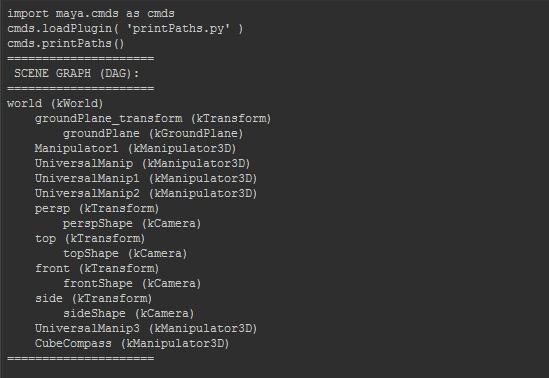
プログラムの概要: 以下のプラグイン コードによって、printPaths() コマンドが作成されます。このコマンドの動作は、アクティブ セレクション リスト に DAG オブジェクトが含まれるかどうかに応じて変わります。1 つまたは複数の DAG オブジェクトが選択されている場合、各オブジェクトの名前、タイプ、DAG パス、および互換性のある関数セット タイプがスクリプト エディタに出力されます。そうでない場合には、DAG ノードの名前およびタイプを使用して、シーン グラフが出力されます。
Python API 2.0:
# pyPrintPaths.py

import sys
import maya.cmds as cmds
import maya.api.OpenMaya as OpenMaya

def maya_useNewAPI():
    """
    The presence of this function tells Maya that the plugin produces, and
    expects to be passed, objects created using the Maya Python API 2.0.
    """
    pass

kPluginCmdName = 'pyPrintPaths'

##########################################################
# Plug-in
##########################################################
class printPathsCmd(OpenMaya.MPxCommand):

    def __init__(self):
        ''' Constructor. '''
        OpenMaya.MPxCommand.__init__(self)

    def doIt(self, args):
        '''
        Print the DAG paths of the selected objects.
        If no DAG objects are selected, print the entire
        scene graph.
        '''

        # Populate the MSelectionList with the currently selected
        # objects using the static function MGlobal.getActiveSelectionList().

        #selectionList = OpenMaya.MSelectionList()
        selectionList = OpenMaya.MGlobal.getActiveSelectionList()

        # This selection list can contain more than just scene elements (DAG nodes),
        # so we must create an iterator over this selection list (MItSelectionList),
        # and filter for objects compatible with the MFnDagNode function set (MFn.kDagNode).
        iterator = OpenMaya.MItSelectionList( selectionList, OpenMaya.MFn.kDagNode )

        if iterator.isDone():
            # Print the whole scene if there are no DAG nodes selected.
            print '====================='
            print ' SCENE GRAPH (DAG):  '
            print '====================='
            self.printScene()
        else:
            # Print the paths of the selected DAG objects.
            print '======================='
            print ' SELECTED DAG OBJECTS: '
            print '======================='
            self.printSelectedDAGPaths( iterator )

    def printSelectedDAGPaths(self, pSelectionListIterator):
        ''' Print the DAG path(s) of the selected object(s). '''

        # Create an MDagPath object which will be populated on each iteration.
        dagPath = OpenMaya.MDagPath()

        # Obtain a reference to MFnDag function set to print the name of the DAG object
        dagFn = OpenMaya.MFnDagNode()


        # Perform each iteration.
        while( not pSelectionListIterator.isDone() ):

            # Populate our MDagPath object. This will likely provide
            # us with a Transform node.
            dagPath = pSelectionListIterator.getDagPath()
            try:
                # Attempt to extend the path to the shape node.
                dagPath.extendToShape()
            except Exception as e:
                # Do nothing if this operation fails.
                pass

            # Obtain the name of the object.
            dagObject = dagPath.node()
            dagFn.setObject( dagObject )
            name = dagFn.name()

            # Obtain the compatible function sets for this DAG object.
            # These values refer to the enumeration values of MFn
            fntypes = []
            fntypes = OpenMaya.MGlobal.getFunctionSetList( dagObject )

            # Print the DAG object information.
            print name + ' (' + dagObject.apiTypeStr + ')'
            print '¥tDAG path: [' + str( dagPath.fullPathName() ) + ']'
            print '¥tCompatible function sets: ' + str( fntypes )

            # Advance to the next item
            pSelectionListIterator.next()

        print '====================='

    def printScene(self):
        ''' Traverse and print the elements in the scene graph (DAG)  '''

        # Create a function set which we will re-use throughout our scene graph traversal.
        dagNodeFn = OpenMaya.MFnDagNode()

        # Create an iterator to traverse the scene graph starting at the world node
        # (the scene's origin). We use a depth-first traversal, and we do not filter for
        # any scene elements, as indicated by the 'OpenMaya.MFn.kInvalid' parameter.
        dagIterator = OpenMaya.MItDag( OpenMaya.MItDag.kDepthFirst,
                                       OpenMaya.MFn.kInvalid )

        # Traverse the scene.
        while( not dagIterator.isDone() ):

            # Obtain the current item.
            dagObject = dagIterator.currentItem()
            depth = dagIterator.depth()

            # Make our MFnDagNode function set operate on the current DAG object.
            dagNodeFn.setObject( dagObject )

            # Extract the DAG object's name.
            name = dagNodeFn.name()

            # Generate our output by first incrementing the tabs based on the depth
            # of the current object. This formats our output nicely.
            output = ''
            for i in range( 0, depth ):
                output += '¥t'

            output += name + ' (' + dagObject.apiTypeStr + ')'
            print output

            # Increment to the next item.
            dagIterator.next()

        print '====================='


##########################################################
# Plug-in initialization.
##########################################################
def cmdCreator():
    ''' Creates an instance of our command class. '''
    return printPathsCmd()

def initializePlugin(mobject):
    ''' Initializes the plug-in.'''
    mplugin = OpenMaya.MFnPlugin( mobject )
    try:
        mplugin.registerCommand( kPluginCmdName, cmdCreator )
    except:
        sys.stderr.write( "Failed to register command: %s¥n" % kPluginCmdName )

def uninitializePlugin(mobject):
    ''' Uninitializes the plug-in '''
    mplugin = OpenMaya.MFnPlugin( mobject )
    try:
        mplugin.deregisterCommand( kPluginCmdName )
    except:
        sys.stderr.write( "Failed to unregister command: %s¥n" % kPluginCmdName )

##########################################################
# Sample usage.
##########################################################
'''
# Copy the following lines and run them in Maya's Python Script Editor:

import maya.cmds as cmds
cmds.loadPlugin( 'pyPrintPaths.py' )
cmds.pyPrintPaths()

'''
Python API 1.0:
# printPaths.py

import sys
import maya.OpenMayaMPx as OpenMayaMPx
import maya.OpenMaya as OpenMaya

kPluginCmdName = 'printPaths'

##########################################################
# Plug-in
##########################################################
class printPathsCmd(OpenMayaMPx.MPxCommand):

    def __init__(self):
        ''' Constructor. '''
        OpenMayaMPx.MPxCommand.__init__(self)

    def doIt(self, args):
        '''
        Print the DAG paths of the selected objects.
        If no DAG objects are selected, print the entire
        scene graph.
        '''

        # Populate the MSelectionList with the currently selected
        # objects using the static function MGlobal.getActiveSelectionList().
        selectionList = OpenMaya.MSelectionList()
        OpenMaya.MGlobal.getActiveSelectionList( selectionList )

        # This selection list can contain more than just scene elements (DAG nodes),
        # so we must create an iterator over this selection list (MItSelectionList),
        # and filter for objects compatible with the MFnDagNode function set (MFn.kDagNode).
        iterator = OpenMaya.MItSelectionList( selectionList, OpenMaya.MFn.kDagNode )

        if iterator.isDone():
            # Print the whole scene if there are no DAG nodes selected.
            self.printScene()
        else:
            # Print the paths of the selected DAG objects.
            self.printSelectedDAGPaths( iterator )

    def printSelectedDAGPaths(self, pSelectionListIterator):
        ''' Print the DAG path(s) of the selected object(s). '''

        # Create an MDagPath object which will be populated on each iteration.
        dagPath = OpenMaya.MDagPath()

        # Obtain a reference to MFnDag function set to print the name of the DAG object
        dagFn = OpenMaya.MFnDagNode()

        print '======================='
        print ' SELECTED DAG OBJECTS: '
        print '======================='

        # Perform each iteration.
        while( not pSelectionListIterator.isDone() ):

            # Populate our MDagPath object. This will likely provide
            # us with a Transform node.
            pSelectionListIterator.getDagPath( dagPath )
            try:
                # Attempt to extend the path to the shape node.
                dagPath.extendToShape()
            except Exception as e:
                # Do nothing if this operation fails.
                pass

            # Obtain the name of the object.
            dagObject = dagPath.node()
            dagFn.setObject( dagObject )
            name = dagFn.name()

            # Obtain the compatible function sets for this DAG object.
            # These values refer to the enumeration values of MFn
            fntypes = []
            OpenMaya.MGlobal.getFunctionSetList( dagObject, fntypes )

            # Print the DAG object information.
            print name + ' (' + dagObject.apiTypeStr() + ')'
            print '¥tDAG path: [' + str( dagPath.fullPathName() ) + ']'
            print '¥tCompatible function sets: ' + str( fntypes )

            # Advance to the next item
            pSelectionListIterator.next()

        print '====================='


    def printScene(self):
        ''' Traverse and print the elements in the scene graph (DAG)  '''

        # Create a function set which we will re-use throughout our scene graph traversal.
        dagNodeFn = OpenMaya.MFnDagNode()

        # Create an iterator to traverse the scene graph starting at the world node
        # (the scene's origin). We use a depth-first traversal, and we do not filter for
        # any scene elements, as indicated by the 'OpenMaya.MFn.kInvalid' parameter.
        dagIterator = OpenMaya.MItDag( OpenMaya.MItDag.kDepthFirst,
                                       OpenMaya.MFn.kInvalid )

        print '====================='
        print ' SCENE GRAPH (DAG):  '
        print '====================='

        # Traverse the scene.
        while( not dagIterator.isDone() ):

            # Obtain the current item.
            dagObject = dagIterator.currentItem()
            depth = dagIterator.depth()

            # Make our MFnDagNode function set operate on the current DAG object.
            dagNodeFn.setObject( dagObject )

            # Extract the DAG object's name.
            name = dagNodeFn.name()

            # Generate our output by first incrementing the tabs based on the depth
            # of the current object. This formats our output nicely.
            output = ''
            for i in range( 0, depth ):
                output += '¥t'

            output += name + ' (' + dagObject.apiTypeStr() + ')'
            print output

            # Increment to the next item.
            dagIterator.next()

        print '====================='


##########################################################
# Plug-in initialization.
##########################################################
def cmdCreator():
    ''' Creates an instance of our command class. '''
    return OpenMayaMPx.asMPxPtr( printPathsCmd() )

def initializePlugin(mobject):
    ''' Initializes the plug-in.'''
    mplugin = OpenMayaMPx.MFnPlugin( mobject )
    try:
        mplugin.registerCommand( kPluginCmdName, cmdCreator )
    except:
        sys.stderr.write( "Failed to register command: %s¥n" % kPluginCmdName )

def uninitializePlugin(mobject):
    ''' Uninitializes the plug-in '''
    mplugin = OpenMayaMPx.MFnPlugin( mobject )
    try:
        mplugin.deregisterCommand( kPluginCmdName )
    except:
        sys.stderr.write( "Failed to unregister command: %s¥n" % kPluginCmdName )

##########################################################
# Sample usage.
##########################################################
'''
# Copy the following lines and run them in Maya's Python Script Editor:

import maya.cmds as cmds
cmds.loadPlugin( 'printPaths.py' )
cmds.printPaths()

'''