Layout Enhancements
Enhancements to your Layout Data and CAD Interoperability
Previously, you needed Inventor, Navisworks, and AutoCAD installed on your computer to successfully sync your layouts using the Sync command on the Factory ribbon. In the 2020 release of Factory Design Utilities, you no longer need all the CAD software installed on your computer to Sync your layout from one CAD to another. You can now simply work in your Factory Design layout using AutoCAD, Inventor, or Navisworks, click Save, and the changes to your layout are automatically applied to all 2D and 3D layouts when you open the layout.
In the past, your Factory Design data was stored in individual CAD files on your computer. Today, all of your layout's Factory Design data is also stored in a LayoutData file keeping your data connected, centrally located, current, and up to date.
New Recommended Factory Design Layout Workflows
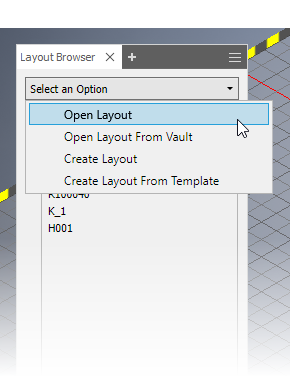
Introducing the new Factory Design Layout Browser. This new Layout Browser serves as a direct-access point to access recently used layouts, open, and create layouts in Inventor and AutoCAD. You can also open layouts using the Layout Browser in Navisworks. When you open your Factory layout through the Layout Browser in Inventor, AutoCAD, or Navisworks, your Factory data is then brought up to date based on the most recently saved data that was saved to the LayoutData file.
To access the new Layout Browser, go to the Factory ribbon > Tools panel > Palettes menu > and select Layout Browser.
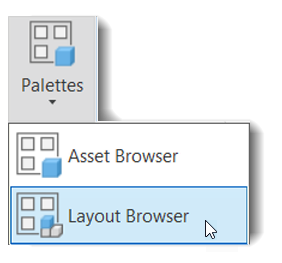
You can also access the Layout Browser from the Quick Access Toolbar located above the ribbon.

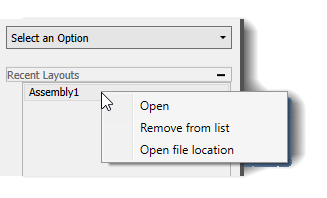
In the Recent Layouts list of the Layout Browser, you can hover over a layout node to view a tooltip displaying the path to that layout on your network or local drive.

You can also access the right-click context menu in the Recent Layouts list to Open a layout, remove a file from the list, or open the file location of a layout.
Related Help topics
- Create a Factory Layout in Inventor
- Create a Factory Layout
- Initiate Cross-Product Workflows in AutoCAD
- To Place Factory Assets
- AutoCAD Layout Browser Reference
New Recommended Workflows to Access Layouts using LayoutData Files
To open a LayoutData file in Inventor that is stored on your local disk, you can select Open Layout from the drop-down menu in the Layout Browser. Your Inventor layout opens in Inventor and is available for you to work in.

Your layout opens and when you edit your layout in Inventor and click save, the next time you open your layout, the 2D equivalent of that layout is also updated. If you open, update, and save the contents of your layout in 2D, the 3D equivalents are updated as well.
Related Help topics
Managing Your Layout Data in Vault
The new Layout Browser and LayoutData file updates in this release of Factory Design let you work with Vault in the following ways:
- To view the latest Factory Design file, you can check out and open the LayoutData file directly from Vault.
- You can still check out and open Inventor, AutoCAD, or Navisworks Factory Design files from Vault. When you check in these CAD files, the corresponding LayoutData file updates with the latest Factory Design data in Vault. For optimal results, access your Factory Design data from the LayoutData file.
- To edit a Factory layout, you only need to check out the CAD file and the corresponding LayoutData file is checked out automatically.
- To save or check in your changes to a Factory Design layout in Vault, you only need to check in the CAD file and the corresponding LayoutData file checks in automatically.