A hierarchical display of a project's contents
What is it?
The project tree is a view in Netfabb. It lists all parts, slices, machine workspaces, other objects as well as loaded modules contained in a project, and it displays the relationship between these elements in tree-like fashion. For example, a module may be loaded on a part, and the loaded module is represented as a branch under the part.
What are its key features?
Sorting and Organizing
- Top-level nodes hold elements of a project according to their type. The tree-like structure illustrates relationship between objects. Parts belonging to platforms, slices, latticing tools – all are sorted into their respective top-level nodes.
- Collapse and expand nodes to save display space
- Sort objects into groups for customized house-keeping in the tree. Groups can be nested in groups themselves.
- Use drag&drop to shuffle objects around
Accessing Elements and Functions
- Active modules loaded on individual parts are represented as sub-nodes and can be clicked to access the respective instance
Indicating Element Status and Properties
- Icons
- display color
- The project tree provides a number of details about the parts, slices, and structures in the model. For example, for parts these include level of detail, visibility, display color, need of repair, shell count, part number. This varies with the entry type. For example, slices have no shell count and cannot have their level of detail adjusted.
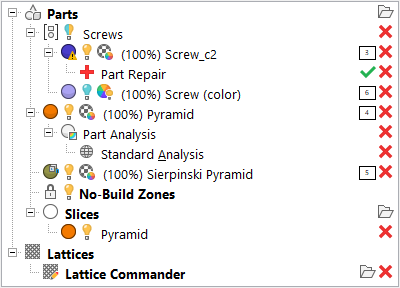
Example of parts, slices, and module branches loaded in the project tree.
- The first part, labeled
Screw_c2, shows an
 yellow lightbulb icon which indicates the part is
visible. The
yellow lightbulb icon which indicates the part is
visible. The
 warning sign on the
 display color swatch for
Screw_c2 indicates that it is considered to require
repair. You can also see that a
display color swatch for
Screw_c2 indicates that it is considered to require
repair. You can also see that a
 Part Repair operation has been opened for this part, and the
 green tickmark next to it provides a shortcut to
apply any repair actions taken during the repair operation.
green tickmark next to it provides a shortcut to
apply any repair actions taken during the repair operation.
- The second part, labeled
Screw (color), shows a
 bluish lightbulb icon which indicates the part is hidden while the
 colorwheel with a yellow lightbulb icon indicates that its
actual color is currently active instead of its display color.
colorwheel with a yellow lightbulb icon indicates that its
actual color is currently active instead of its display color.
- Screw_c2 and
Screw (color) are members of the
 group named
Screws.
group named
Screws.
-
Sierpinski Pyramid shows up as a part containing
 multiple shells and also as having
 no actual color or texture.
-
 No-Build Zones: Parts under this node have the function of immovable placeholders that occupy space that mustn't be used by functions like automated packing. This is in addition to no-build zones that come with machine workspaces.
- A
 slice stack of
Pyramid has been created in the
slice stack of
Pyramid has been created in the
 Slices section of the default
 Parts platform, and its
display color is orange.
Parts platform, and its
display color is orange.
- Other icons,
 Remove,
 Add, and
Apply Part Repair, provide additional functionality.
Add, and
Apply Part Repair, provide additional functionality.