Volumes on the build platform that mustn't be occupied by parts
The no-build and no-packing zones across Netfabb have been reworked and unified into one common function. No-build zones now look the same everywhere, on regular part platforms and machine workspaces.
Jump to:
What is it?
No-build zones are volumes that forbid placing any part volumes such that they intersect with them. This is enforced by preventing automated processes such as packing from claiming the space of the no-build zones and by notifying you if you cause an intersection manually.
TopWhat are the key benefits?
- No-build-zones are placeholders within Netfabb and are not actually printed.
- Parts can be freely converted from and into no-build zones.
- No-build zones have their own section in the
project tree,
 and you can toggle the visibility of them individually and as a group, both through their
project tree icons, the menu option
View >
and you can toggle the visibility of them individually and as a group, both through their
project tree icons, the menu option
View >  Toggle No-Build Zone Visibility as well as using the global keyboard shortcut
Shift+N.
Toggle No-Build Zone Visibility as well as using the global keyboard shortcut
Shift+N.
- No-build zones are observed during toolpath creation in workspaces, when moving parts to Slices, and when running packers.
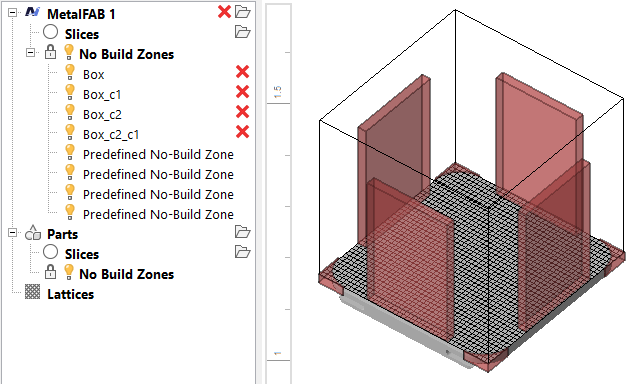
In this example, the zones at the corners are machine-specific, the zones along the sides are user-defined. All are listed in the project tree.
How do I access them?
Part platforms, including those provided by machine workspaces, have a No-build zones section in the project tree. Moving parts into such sections turns those parts into no-build zones:
- Move parts by drag&drop in the project tree.
- Parts turned into no-build zones become protected from moving or selecting in the display.
Custom no-build zones are stored in a FABBPROJECT file, and they can also be stored with a machine in My Machines as a template. A template is a set of parts that is loaded immediately when the machine is loaded into the project tree.
To store a template for a machine
- Arrange parts and no-build zones on the machine workspace's platform
- Right-click the machine in the project tree and choose Save machine template.
In addition, some machines come with zones already defined. These zones are part of the machine workspace definition and cannot be modified.
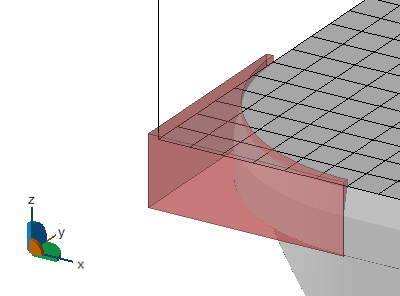
Example of a no-build zone as defined by the machine workspace