Edit individual triangles, edges, and nodes
The manual repair tools allow you to perform simple repair and mesh editing operations. Enter repair by selecting the part to repair, then click
 Home >
  Repair Part.
Jump to:
 To add triangles
 To add nodes
 To add a free triangle
 To remove an edge
 To move a node
 To remove selected triangles
 To flip selected triangles
To add triangles
Add triangles to manually close holes or connect edges.
- From the main menu, click
Add Triangles.
- Click an edge surrounding a hole. The selected edge is highlighted in blue.
- Hover your mouse over the other edges around the hole to preview the shape of the added triangle. The triangle preview is shown in green.
- Click an edge around the hole to add the triangle.
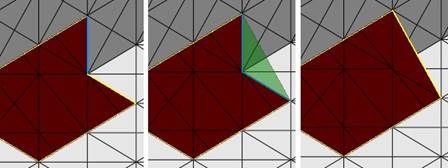
Left: First edge highlighted in blue. Middle: Preview of new triangle. Right: Resulting triangle.
To add nodes
Add nodes to refine the triangle mesh by manually inserting new corner points.
- From the main menu, click
Add Nodes.
- Hover the mouse pointer over the part to preview the new node position on the triangle and the resultant triangles to be created.
- Click the location to insert the new node.
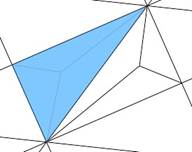
Preview of a node to be added to the middle of a triangle.
To add a free triangle
Add a triangle to an open edge (yellow). Free triangles don't have to be connected to two edges when dropping them into place.
- From the main menu, click
Add Free Triangle.
- Click and hold an edge surrounding a hole. The selected edge is highlighted in blue.
- While still holding down the left mouse button, move your mouse around the part to preview the shape of the free triangle.
- Release the mouse button to add the triangle.
To remove an edge
Remove individual edges from the mesh to reduce the number of triangles required to define a plane or to improve the mesh quality.
- From the main menu, click
Remove Edge.
- Click an edge in the part to remove. The part mesh adjusts to account for the missing edge.
To move a node
Moving nodes allows you to quickly adjust the shape and curvature of the part.
- From the main menu, click
Move Node.
- Click and drag a node in the part to its new position.
When clicked, a label with the X, Y, and Z coordinates of the node appears.
- Release the mouse to finish the move operation.
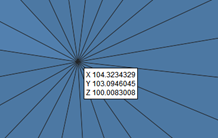
The coordinate label updates dynamically as you reposition the node.
- Right-click the coordinates label to open the
Move Node dialog:
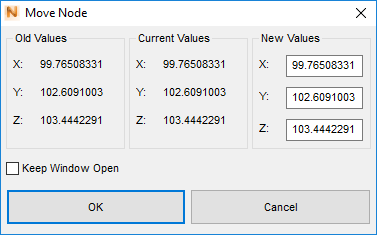
- Enter X, Y, and Z coordinates.
- Click OK to move the node to the coordinate location specified.
To remove selected triangles
- Select one or more triangles.
- From the main menu, click
Remove Triangle.
To flip selected triangles
- Select one or more triangles.
- From the main menu, click
Flip Selected.