Visual aid to tell separate parts from each other
Jump to:
- What is it?
- How does something get a display color?
- How do I change the display color of individual parts or slice stacks?
- How do I change the lists of default display color?
- Global display colors
What is it?
The display color is a color that Netfabb uses for the surface of a part or the contours and hatches of slice stacks. This information exists only within a project and is saved in a FABBPROJECT file.
Cases when a display color is used
- A part has no actual color or texture information.
- Actual color or texture information exists, but is switched off.
- A slice stack is being displayed.
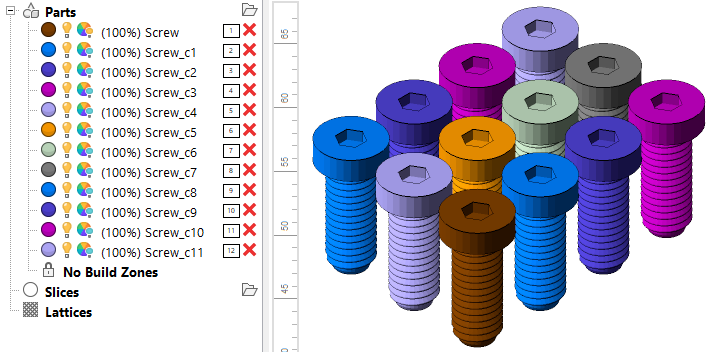
Display colors represented in the project tree and in the display
How does something get a display color?
Whenever a new or a replacement part or slice stack enters Netfabb, it gets assigned a color from a rotating color list.
Example cases that add parts or slices
- Adding a part to a platform
- Importing a CAD assembly as mesh and splitting it into distinct parts (optional)
- Repairing, duplicating, performing Boolean operation, manipulating mesh, cutting, converting to BREP, generating a label, …
- Copying and pasting parts
- Moving a part to slicing
- Moving a slice stack to a part platform, generating a mesh from the slice information
In particular, the last two operations apply the same display color to the conversion results as the conversion sources had.
Examples where the existing display color is kept
- Moving, rotating, scaling, mirroring a part
- Performing Z compensation
How do I change the display color of individual parts or slice stacks?
For parts and slices, Netfabb provides a menu option that does just that.
Select a part or a slice stack, then choose
Edit >  Change Display Color. Use the color picker dialog to choose a new display color.
How do I change the lists of default display colors?
You can change the lists of colors in the settings. Choose

 Settings > Settings > General > Colors and modify
Part Color 1 through 8 for parts, or choose
Settings > Settings > Slice Commander > Colors and modify
Slice Color 1 through 8 for slice stacks.
Settings > Settings > General > Colors and modify
Part Color 1 through 8 for parts, or choose
Settings > Settings > Slice Commander > Colors and modify
Slice Color 1 through 8 for slice stacks.
Global display colors
Display color can also be the temporary color that Netfabb uses to visualize a property, like wall thickness, or which side of a triangle is its inside. The colors used for such visualization are set in the Netfabb settings.
Settings > Settings > General > Colors and modify
Highlight Color.