Drag and drop function blocks and chain their inputs and outputs to define toolpath calculation
Producing the actual toolpaths from tracing a 3D shape's contours follows a formulaic approach. The calculation of the build process is broken down into basic steps such as applying hatching, generating an offset, filtering for intersections, and many others. Chained together, their result is the final toolpath.
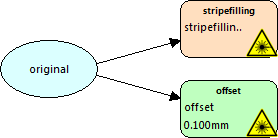
The toolpath calculation operates on slice stacks, or a list of layers representing either an outer geometry or the hatches (line filling of an area) of a part. The slice stacks for the part and the supports are recognized individually. Filters are used to operate on and modify these slice stacks.
 The editor provides
undo&redo as well as
copy&paste functionality for ease of use and to replicate filter settings.
The editor provides
undo&redo as well as
copy&paste functionality for ease of use and to replicate filter settings.