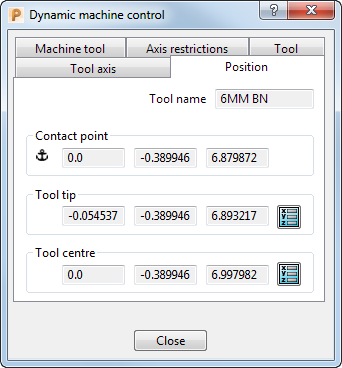
The Position tab on the Dynamic machine control dialog displays the tool position in the X, Y, and Z axes (relative to the active workplane). The values update automatically when you use the grab-handles to adjust the tool position.
This tab contains the following:
- Tool name — The name of the tool.
-
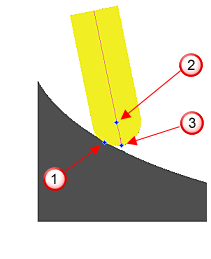
Contact point — Displays the contact point between the tool and the model
 .
. -
Tool tip — Displays the position of the tool tip
 .
. -
Tool centre — Displays the position of the tool centre
 .
.The Tool centre box is displayed only when you are simulating a tool that has a spherical tip, such as a ball nosed tool.
-
 Anchor point — This icon indicates which point PowerMill is currently using as the centre of rotation when you move the machine tool. It appears in the following areas:
- Contact point — When the tool is in contact with the model.
- Tool tip — When the tool is not in contact with the model and the simulated tool has a non-spherical tip, such as a tip radiused tool.
- Tool centre — When the tool is not in contact with the model and the simulated tool has a spherical tip, such as a ball nosed tool.
-
 Position — Click to display the Position dialog. The dialog enables you to define the position of tool by specifying the position of the tip or centre of the tool. You can use the dialog to specify the tool position instead of using grab-handles.
Tip: You may find it useful to use the grab-handles to define the tool position approximately and then use the Position tab to specify the tool position more accurately.