Fine-tune a number of factors to get optimal performance from the Autodesk Vault server.
Operating system
A dedicated server operating system such as Windows Server 2016 or Windows Server 2019 is preferable to workstation operating systems.
Server memory
In order to determine whether the server has enough available memory, some key factors must be considered: the size of your data and the number of users concurrently accessing the Vault server.View memory usage
- Invoke the Task Manager by right-clicking in the taskbar or pressing CTRL.
If the Commit Charge Total regularly exceeds the total amount of physical memory, it is likely that many of the programs and processes on the server are using the disk-based swap file excessively. Using the swap file is much slower than using physical memory. Windows uses the swap file for many tasks, so a small amount of swap file usage will not cause any problems.
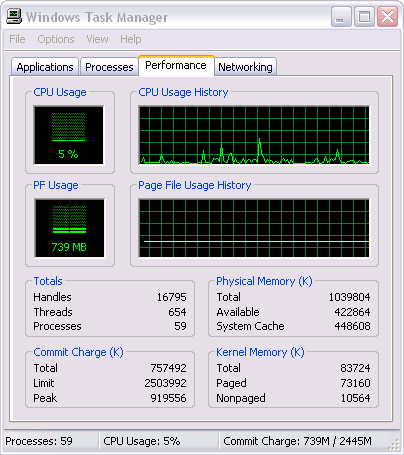
- If you suspect that your server has an inadequate amount of memory, check the Commit Charge Total value. Clicking the Processes tab reveals more details on the memory usage of all programs or processes.
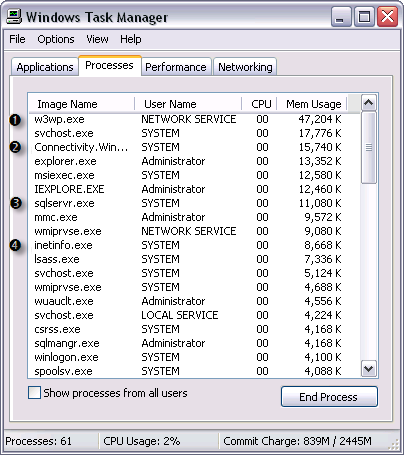
Initial memory usage by Autodesk Vault server.
- IIS Web Server process (there may be many of these running).
- Autodesk Vault server notification process.
- Microsoft®SQL server process.
- IIS main Web server process.
Memory usage after adding a large Inventor drawing and associated files.
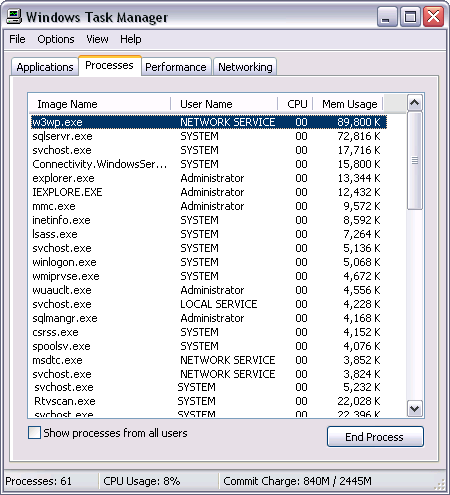
In general, SQL Server memory grow over time. This is because the database server is using memory as fast cache buffers for frequently used queries. As other programs request memory on the server, SQL Server releases memory as needed. Similarly, the IIS worker process (w3wp.exe in Windows 2003 server) reserves memory for caching as well. When the system starts running low on physical memory, the operating system reclaims some of this memory. In general, unless you have a large site with many users or large models, this will not need to be changed.
Disk performance
Using multiple disks generally enhances system performance. There are many types of disk technologies available, such as the Redundant Array of Inexpensive Disks (RAID). Choosing which type of disk technologies depends on the number of users, vault size, frequency of updates, and so on.
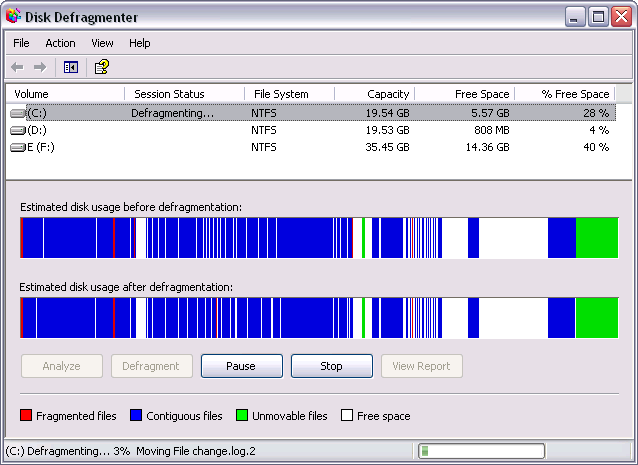
Disk fragmentation can also greatly affect Autodesk Vault server performance. Most Windows editions provide a disk tool that measures how the files on your computer are stored on disk.
Run the disk defragmenter
- Click Start ► All Programs ► Accessories ► System Tools ► Disk Defragmenter.
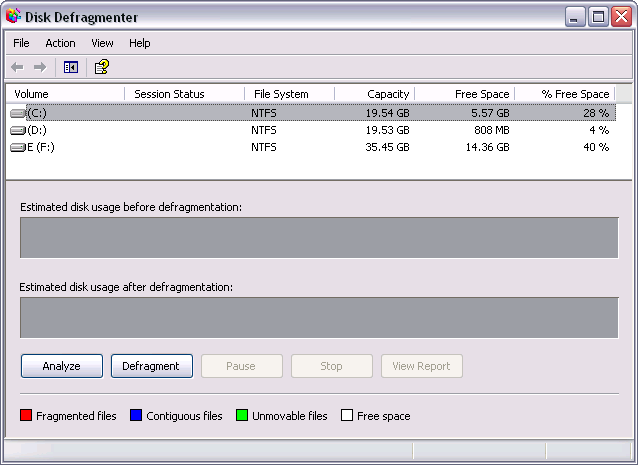
- Choose a disk (volume) and click Analyze. Following analysis, a report appears.
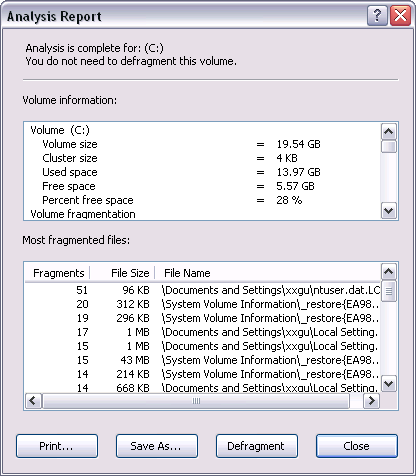
- Click the Defragment button.
Aggressive anti-virus programs
Some types of Anti-virus programs scan data coming from the network and data being written to the file store. If your anti-virus software appears to be engaged for too long on vault operations, such as uploads, adjusting the scanner settings may help.
There is, of course, a trade-off between security and performance. Because of this, performing some test cases and benchmarks on your own data and server is recommended.
CPU
Faster or multiple CPUs can improve vault performance. Since this option is typically more expensive than the others, consider it after you review the other areas.