Various methods to insert new triangles along open triangle edges, to make a mesh watertight
The semi-automatic methods for closing holes help you avoid the need to manually add triangles.
Trivial holes are holes enclosed by exactly three triangles, so the missing triangle can simply be added. Non-trivial holes are enclosed by more than three triangles, so the circumference needs to be traversed and triangles be added to close it.
Jump to:
To close holes globally
These methods ignore any selection of triangles.
To close simple holes anywhere on a part
- In the context view, click
Close Holes >
 Trivial.
To close holes with a particular range of edge lengths anywhere on a part
- In the context view, click
Close Holes >
 Close Defined Holes.
- Make your choice for edge length range the closing of holes should apply to, and click OK. The edge length of a hole is the sum of open edges of triangles surrounding the hole.
To close all holes no matter the shape, size, or location on a part
- In the context view, click
Close Holes >
 All.
All.
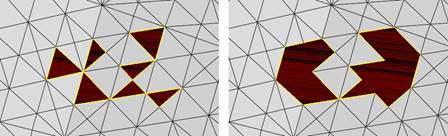
Left: Only one triangle is missing in each hole. They can be repaired with Close Trivial Holes. Right: All attempts to repair all holes regardless of complexity.
To close holes interactively
Holes have a dedicated context menu, too. Right-click the yellow highlighting line of a hole to open it.
To close a hole of choice on a part
- Right-click an edge around a hole
- From the context menu choose
Close Hole.
To close holes across curved surfaces
Closing a hole by adding triangles without considering the surrounding triangles' orientation is fast but does not preserve or regenerate the original shape, which becomes more apparent the more curved the area of the mesh is. For such cases, a method is available that attempts to recreate the original curved surface by sampling the surrounding triangle's orientation.
- Find the hole that you want to have fixed.
- Right-click the hole's edge and choose
 Select all surrounding triangles from the context menu.
- From the main menu, choose
Mesh Edit > Close freeform holes.
- Make any required adjustments, then click OK.
Options
- Density Factor: Attempts to keep the newly generated triangles at a size equal to the sizes of the surrounding triangles times this value.
- Smooth Factor: How strongly any smoothing should be performed, if any.
- Scale Factor: A corrective value that adjusts the "bulginess" of the generated surface curve
- Boundary Rotate Factor: If a bend or bulge with a dominant axis is determined, it may not align with the dominant curvature of the original mesh. Use this to rotate the axis to correct for such misalignment.
- Close Flat: Foregoes any shape reconstruction and just closes the hole with effectively the smallest surface area possible.
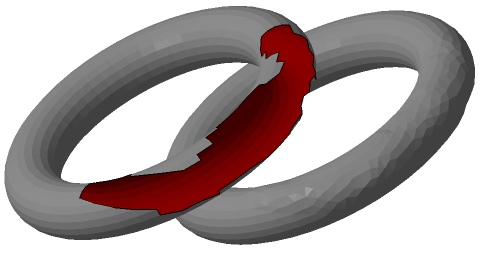
The hole in the torus to the left has been fixed on the right.