Drawing View is a configuration mode that lets you assign individual copy actions to drawings.
Check the Drawing view option in the menu to display the drawings in the main grid.
Default Behavior for Associated Drawings
Use the view to access and assign individual copy actions to drawings. The linked action is denoted by a value of Auto in the Action column.
For example, if a file is marked for copy and the associated drawing is marked as Auto, the drawing receives the same new file name and save location as the associated file when the copy operation completes.
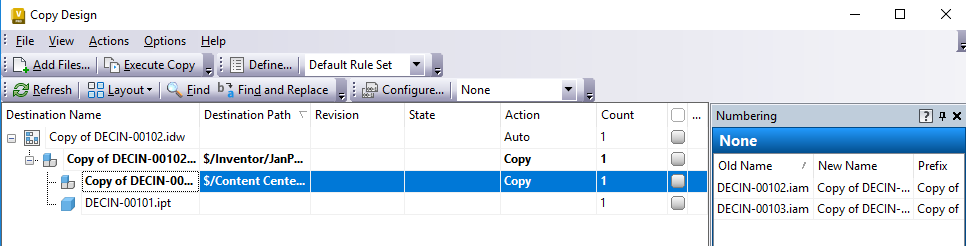
In Model View, documentation set to Auto takes the same name as the dependent file being replaced or copied. This can result in file name duplication. Go to View > Show Drawing View to turn on the Drawing View to help resolve file naming conflicts.