The updated LookdevX introduces a variety of new features, among them the ability to solo nodes.
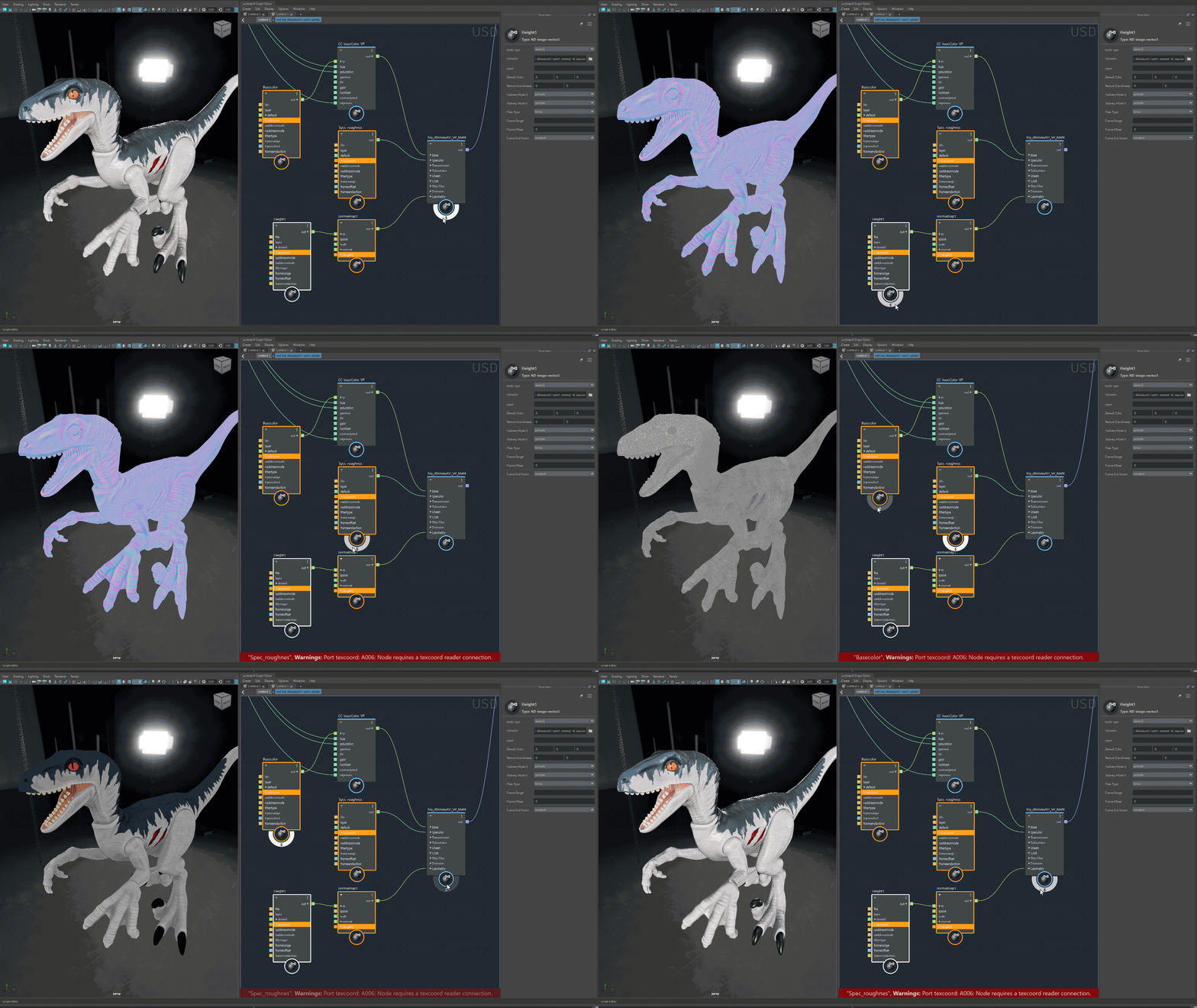
Soloing enables faster lookdev workflows and efficient graph troubleshooting. By soloing a node in the graph, users can inspect the render of its upstream nodes. This feature supports both Arnold and MaterialX graphs, including materials, shaders and compounds.
- LookdevX graph controlled by DCC's Color Management preferences:
All color management operations are controlled by the DCC's color manager, allowing you to trust color accuracy. This includes: input color spaces for textures, color pots, color picker and color swatches. Color Management data is also precisely embedded in USD files to be read from them accurately.
- USD relative path integration:
You can now enable the relative path workflow, which is automated with a single click. You are also provided the option to switch from relative to absolute paths and vice versa. This implementation is integrated through the Maya USD plug-in. See Relative Pathing.
- USD smart signaling:
A USD interface has been updated to send messages to third-party renderers, instructing them not to restart rendering while moving nodes or backdrops. Smart signaling is integrated into the Maya USD plug-in and is intended to be adaptable.
- Copy, paste and duplicate nodes or materials:
Perform copy, paste, and duplicate operations using the Outliner and LookdevX toolsets. Also, duplication can be executed with or without other connections.
- Dynamic port workflow:
Work with a streamlined shader creation workflow by using one unified shader instead of multiple separate shaders. Within the parameters panel, select your desired shader type. If there are any issues with the type selection, intuitive error messages will help guide you to find the right shader type by highlighting the problematic node and providing detailed explanations in the info panel.
- Shader component workflow support:
Delve into advanced graphing using the integrated component workflow. Multichannel EXR workflows are now fully functional within USD, MaterialX and Arnold shading graphs.
- Component tags - direct material assignment:
Assign materials to native USD Geometry subsets with confidence. When USD geometry is converted into Maya geometry and vice versa, any material changes made on either data model will be accurately preserved.
- Drag and drop:
Drag and drop files from an external file browser.
- Backdrop:
Backdrops are organizational nodes that enhance the readability and usability of graphs. They offer a range of functions compatible with various data formats.
- Enums supported in Property and Attribute Editors:
LookdevX Parameters panel now supports integer enums in the dropdown menu.
- Context sensitive Tab search:
You can see a context sensitive list with only surface nodes when accessing the Tab menu at the top level.
- LookdevX Tabs:
Tab states are saved in a Maya scene.
- Expand and collapse groups:
All sibling groups in the LookdevX Parameters panel can be expanded and collapsed simultaneously using Shift-click.
- Input/Output node locations:
Locations of the input/output nodes are now remembered in LookdevX Graph Editor.
- Node Placement upon creation:
Newly created nodes now appear in a more predictable location.
- Debugging:
Print the underlying data of a node or the error message by right-clicking on a node in LookdevX and selecting Print to Script Editor.
- Auto Expand node groups:
Auto Expand delay is tuned to 100ms.
- Renaming:
Rename nodes using the Enter key.
To see the full list of the new features, improvements and bug fixes, see LookdevX for Maya v1.2.0 Release Notes.
- Introductory LookdevX tutorials on the Maya Learning Channel.
- LookdevX tutorials on Autodesk Media & Entertainment.