Dialog elements and functions explained
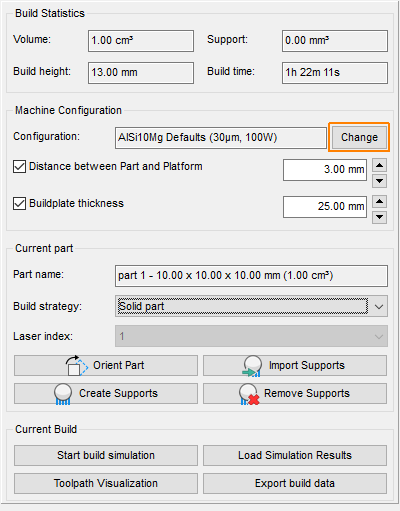
To enter the configuration editor, click Change in the context view of a PBF-type machine workspace.
Jump to:
- Working with a selection in the configuration editor
- Editing a configuration
- Global settings parameters
- Configuration details for Simple-type configurations
- Configuration details for Programmable-type configurations
- Configuration details for Diagram-type configurations
Working with a selection in the configuration editor
This is the first page of the configuration editor. Select a configuration to proceed.
Context menu options
- Edit: Opens the parameter pages available for editing in of the selected configuration. These pages are specific to the type of configuration (simple, programmable, EBPA, machine-specific). Only custom configurations can be edited. Attempting to edit a built-in configuration prompts to create an editable duplicate.
- New from template: Opens a dialog to create a custom configuration from a selection of built-in configurations
- Delete: Deletes custom configurations. Built-in configurations cannot be deleted.
- Duplicate: Immediately duplicates the selected configuration, built-in or custom, and renames the duplicate by prepending "Duplicate of"
- Import: Opens an Open File dialog to browse for an importable build configuration in the TOOLPATHXML format previously exported from Netfabb
- Export: Opens a Save File as dialog to save the selected configuration in the TOOLPATHXML format. EBPA configurations can be exported like that as well, but maintain the encryption for the logic part.
- Import EBPA buildstyle: Opens an Open File dialog to browse for an EBPA file
Selection options
- Show only custom configurations: Hides all built-in configurations
- Show laser distribution: Hatch the build platform in different colors to illustrate the areas where multiple lasers are able to reach, where applicable
Selection buttons
- New, Delete, Edit: as above
- Select: Closes the configuration editor and sets the selected configuration as the one to use in the current machine
Editing a configuration
| Current configuration | ||
|---|---|---|
| Name |
Text that appears in the machine workspace context view to indicate which configuration was chosen. |
Caution: Netfabb does not prevent you from having multiple configurations with the same name.
|
| (UUID) |
A unique ID used by Netfabb to tell configurations apart. Normally nothing to worry about during regular work, but may be used for trouble-shooting when suspecting configuration-related conflicts. |
|
| Description |
Text to provide more detail, or a comment |
|
| Type |
One of Simple, Programmable, Diagram, EBPA, or a machine-specific custom type |
|
| Change type |
Simple-type configurations may be converted to Programmable or Diagram, and configurations of type Programmable or Diagram may be converted into their respective opposite. |
|
| Configuration details | ||
| (parameter list), XML program code, or (visual programming tools) |
Lists parameters exposed by Simple- or EBPA-style configurations, or lists the XML source code for the build strategies contained in the configuration, or visualizes relationships between calculation blocks in it For EBPA-type configurations, shows a separate page for platform settings that affect the whole build. This can include an exposure order setting that overrides the one set on the Global settings tab. |
|
| Global settings | ||
| (parameter list) | Lists parameters pertaining to, or affecting, the whole build |
Global settings parameters
-
Build time calculation
- Spot size: Used to calculate the volume occupation for volumeless, open structures such as open structured support that is exposed with just a single line
- Build rate: Used to estimate the build time of the project
- Recoating time: Period of time inserted between layers to account for recoating in the build time estimation
-
Tray settings
- Pretoolpath scaling X, Y, Z: Scales the entire buildroom before slicing and toolpath generation by these amounts
 Part order: Determines the order in which the parts are exposed.
Choose from:
- Project tree: Same order of parts as in the project tree. Use drag&drop to change the order.
- Left to right: +X
- Right to left: -X
- Front to back: +Y
- Back to front: -Y
Caution: Toolpathing algorithms in an EBPA may override these.
-
Scan first layers multiple times: Repeats exposure of the first few layers
- Number of layers: How many of the first few layers to repeat the exposure for
- Multiple scan count: Expose this many times per layer
- Naming
- Part suffix
- Open support suffix
- Closed support suffix
Configuration details for Simple-type configurations
Simple-type configurations expose or present a selection of parameters that are converted internally to XML-programmable toolpathing. Simple-type configurations are not user-definable, configurations cannot be converted to this type.
TopConfiguration details for Programmable-type configurations
The Programmable type is a text-based display variant for Netfabb's XML-programmable toolpathing, showing the actual XML code.
TopConfiguration details for Diagram-type configurations
The Diagram type is a graphical display variant for Netfabb's XML-programmable toolpathing. Configurable function blocks and connection lines both visualize and provide visual programming access to the definition of the build strategies contained within a build configuration.
Graphical toolpath editor
 Select: Use to select existing function blocks and reveal their settings in the view by the right-hand side of the editor. This mode must also be chosen when right-clicking a connection to access its context menu.
 Create connection: Use to define output-input relationships between function blocks. Functions can have as many outputs as required. Some functions require multiple inputs.
 Create offset: Draws the closed input contour displaced by this value. Positive numbers mean an offset towards the area enclosed by the contour.
 thinwalls: Generates a hatchline along very narrow or acute sections of contours where regular filling or contour offsets would leave an unacceptable gap.
 subtract: Performs a Boolean subtract of two closed contours.
Requires two inputs. Right-click their + and - labels and choose Switch input for Subtract from the context menu to flip assignment when the connections have already been created.
 intersection: Performs a Boolean intersect of closed contours, including intersecting contours in its own source.
Can have multiple inputs, forwarding only the intersection formed by all involved contours.
 unify: Performs a Boolean unification of closed contours, including intersecting contours in its own source.
Can have multiple inputs, forwarding the unification formed by all involved contours.
Tip: Use to unify solid support bars in bouquets as bundling the individual bars naturally creates multiple intersections. linestippling: Subdivides contours into short segments that are then exposed in interleaved order
 axisfilter: Crops input toolpath to specified ranges along X and Y and discards any offcuts
 downskin,
 upskin: Identifies contour segments that correspond to upwards or downwards-facing surfaces with shallow angles against the horizontal
 hatchfilling,
 stripefilling,
 quadfilling,
 checkerboard,
 radial hatches: Generates area-filling hatching in various variants from contour input
 layerfilter: Selectively forwards or discards toolpath data for calculated layers
 hatchsort: Changes the draw order of hatches
 regionsort: Changes the draw order of contours
 hatchcutting: Trims hatches with a contour as a stencil
Requires an input of hatches and an input of contours. Right-click their H ("hatches") and S ("stencil") labels and choose Switch input for Hatch cutting from the context menu to flip assignment when the connections have already been created.
 hatchextension: Uses an experimental algorithm to lengthen hatches for machines that do not compensate for laser switching and galvo acceleration themselves ("skywriting")
 Rasterization: Toggles grid snapping for positioning the function blocks
 Arrange: Attempts to distribute the function blocks across the available space to avoid overlapping
 Freeze: Toggles fixation of the function blocks to the view area
 Undo,
Undo,
 Redo: Takes back changes, or applies them after all