The Settings Page of the License Wizard is used as part of the process of selecting the license to be used by users on a client PC.
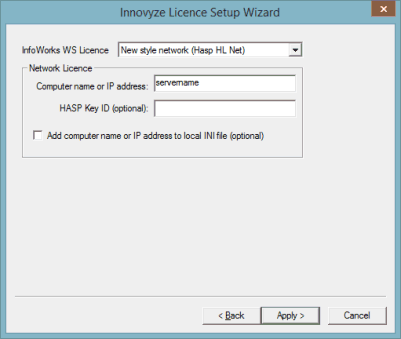
Select the type of license to be used.
- Autodetect local - allow the software to detect the type of license attached to the PC on which the license key setup program is being run.
- Old style network (Net Hasp) - use network license type issued prior to version 2.0 (dongle license)
- New style network (Hasp HL Net) - use network license type issued from version 2.0 onwards (dongle license)
- Old style local (Sentinel) - use local license type issued prior to version 2.0 (dongle license)
- New style local (Hasp HL Max) - use local license type issued from version 2.0 onwards (dongle license).
- Local soft license - use local soft license.
- Network soft license (checked out) - use checked out soft license. The soft license is 'checked out' from the server, and can be used on a PC that is not connected to the license server. To check out a soft license, the Check in / out soft licenses from the floating license server option of the Welcome page must be selected.
- Network soft license (on demand) -use on demand network soft license. This works in the same way as a network dongle i.e. users get a license when using the Innovyze product but the license is relinquished when they stop running the software. It is necessary for such users to be connected to the license server.
- Thales - use a Thales network license.
If selecting a network type license, enter network license details:
- Computer name or IP address - name or IP address of the network license server.
- HASP Key ID (optional) - enabled if New style network is selected. Enter license ID (use if there is more than one network dongle attached to the server).
- License number (optional) - enabled if Network soft license (on demand) is selected. Enter license ID (use if there is more than one network dongle attached to the server).
- Code - enabled if Thales is selected. A read-only field that displays the code for the selected TS size and Engine size.
- Add computer name or IP address to local INI file (optional) - only displayed when setting the license for the current user. Enabled if New style network is selected. Check this option to add details to a configuration file (may be needed to allow license client software to connect to server). This option is not displayed when setting the license for all users, as details are automatically added to the configuration file if required.
- TS size - enabled when the License type is set to Thales, and allows you to choose from a drop-down list, the maximum number of nodes / elements that can be used in InfoWorks WS Pro using the specified Thales license.
- Engine size - enabled when the License type is set to Thales, and allows you to choose from a dropdown list, the maximum number of nodes / elements that can be processed by the InfoWorks WS Pro engines using the specified Thales license.
Click the Apply button to apply the settings. If the update is successful, the Finish page will be displayed.