This wizard allows users to perform the following tasks for licenses obtained from Innovyze:
- select the license to use with the software.
- choose which licenses are used with the application by the current user.
- check in and check out soft licenses.
- manage dongle upgrades. This includes applying upgrade files sent by Innovyze and generating upgrade files to send to Innovyze.
- manage soft licenses. This encompasses registering, unregistering and revoking soft licenses.
- test a dongle or soft license server, as well as get soft license details.
Licenses to Innovyze products can be provided to users in dongles (local or network dongles can be used) or via soft licenses. Soft licenses are more flexible and do not require the use of dongles. Soft licenses are not attached to a user but to a PC, and can be checked out from a floating license server to be used on a specific PC. That PC does not need to be part of a network, which can be very useful if the user is working from home or visiting a customer. That particular license is then unavailable to any other users until either the number of days it has been checked out for has elapsed or it is checked back in.
When using a license on a dongle or a soft license, it is necessary to perform a simple configuration step on each client PC.
The License Key Setup program can be run from the Start menu for all the Innovyze workgroup products.
When the program is started, the Welcome page is displayed:
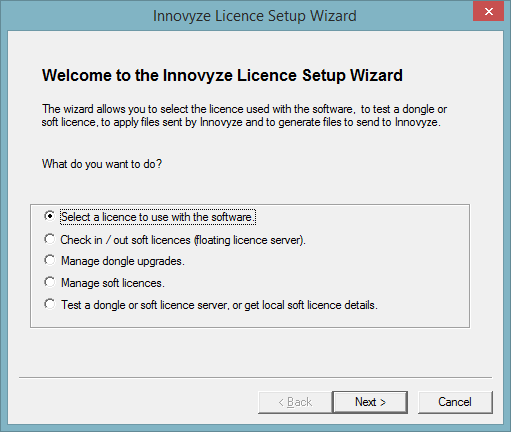
The setup wizard options are:
- Select a license to use with the software - select the license to be used by the current user or all users on a client PC.
- Check in / out soft licenses from the floating license server - check in (grab) or check out (release) soft licenses from the server. Selecting this option displays the Specify Floating License Server page, where the server containing the floating licenses can be selected.
- Manage dongle upgrades - upgrade a dongle from a .v2c upgrade file provided by Innovyze or create a .c2v dongle status file to send to Innovyze. This option only applies to new style dongles (both local and network) and can only be used if the dongle is attached to the PC on which the license key setup program is running.
- Manage soft licenses - register, unregister or revoke soft licenses. Selecting this option displays the License Action page.
- Test a dongle or soft license server, or get local soft license details - display details for a selected dongle or soft license.
Click the Next button to display the next page of the wizard for the selected option.