In addition to excluding whole items from the report, you can exclude individual measurements. This is useful if you want to highlight only the important measurements for an item.
For example, to exclude measurements from a circle:
- In the Sequence Tree, double-click Circle 1.
The Probed Circle dialog is displayed.
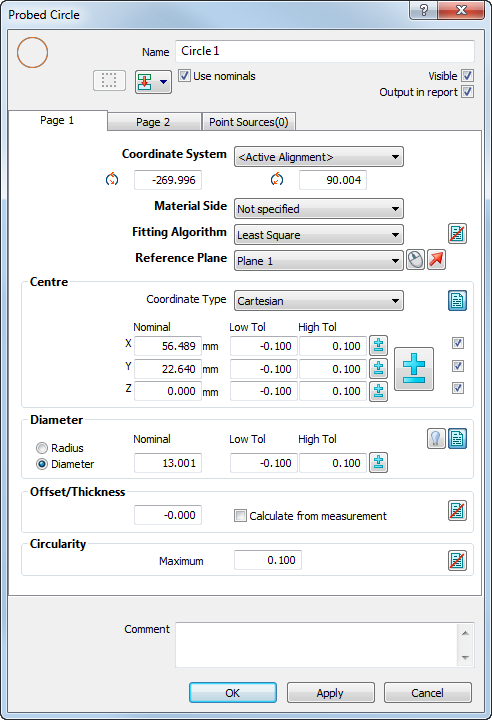
- In the Centre area, deselect the Output in report check box to the right of the Z coordinate to exclude the coordinate from the report and the circle's label in the CAD view.
Alternatively, to exclude all the Centre coordinates, click the Output in report
 button. The icon changes to
  . Click the button again to reinstate the measurement in the report.
 PowerInspect ignores excluded measurements when determining whether an item is in- or out-of-tolerance. This can affect the status icon shown in the inspection sequence and the border colour of the item's label.
- When you have made your selections, click Apply to save your changes and leave the dialog open.
Deselecting the Output in report check box for a measurement also excludes it from the item's label. You can confirm whether a measurement is included in the report by clicking an option in View tab > Labels panel > Geometry, and checking the item's label in the CAD view.
- Click OK to save your changes and close the dialog.