Belleville Spring Generator dialog box - Design tab
Sets parameters for the design of a Belleville spring.
Access: | Ribbon: Design tab  Spring panel Belleville Spring panel Belleville  |
Dimensions
Use this section to specify a type of spring and single-disk spring dimensions.
Spring Type | Click the down arrow to display a dialog box where you can select the standard of designed spring (ANSI, DIN, or CSN). If you do not specify a standard, all spring types are displayed. According to your standard selection, the springs are loaded to the calculation and a list of allowable springs is displayed in the Single-disk Spring Dimensions pull-down menu. |
Single-disk Spring Dimensions | Displays the list of allowable spring dimensions. The list depends on the selected spring type. |
|
| Click to open the dialog box where you can edit the spring dimensions or add your own dimensions. |

Spring Set
Check the box to specify the spring set options.
Placement
Specify a placement option and the type of spring loaded state.

 Unloaded State single-disk height is equal to unloaded height of the spring.
 Loaded State single-disk height is equal to unloaded height of the spring minus deflection of one disk.
Summary of Messages
Displays the reports about calculation. To open the Summary of Messages area at the bottom of the Calculation and Design tabs, double-click the double line at the bottom of tabs or click the chevron at the bottom of the tabs.
Graphical Preview
A graphical preview of the selected geometry is displayed in Autodesk Inventor. You can use grips to specify Belleville spring parameters.
Stand-alone spring
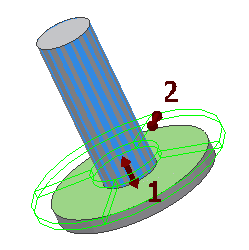
- Use the grip to move the spring along its axis. Double-click the grip to edit the value.
- Use the grip to change spring size based on outside diameter.
Spring set parallel
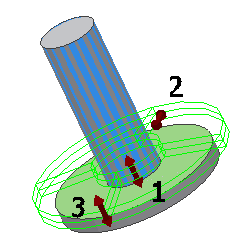
- Use the grip to move the spring along its axis. Double-click the grip to edit the value.
- Use the grip to change spring size based on outside diameter.
- Use the grip to change the number of springs in parallel.
Spring set in series
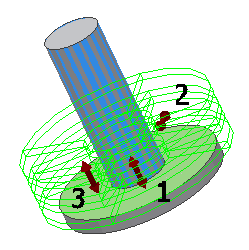
- Use the grip to move the spring along its axis. Double-click the grip to edit the value.
- Use the grip to change spring size based on outside diameter.
- Use the grip to change the number of springs in series.
Spring set in series and parallel
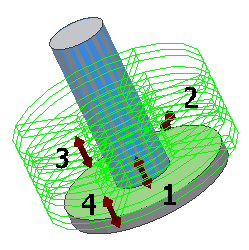
- Use the grip to move the spring along its axis. Double-click the grip to edit the value.
- Use the grip to change spring size based on outside diameter.
- Use the grip to change the number of springs in series.
- Use the grip to change the number of springs in parallel.