About Preparing an Inventor Assembly as BIM Content
As a manufacturer of products used in the AEC industry you may want to produce models compatible with BIM requirements.
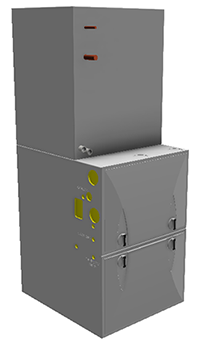
Users of BIM software, such as Autodesk Revit, want simplified models for purchased components. You use Autodesk Inventor to create the fully-detailed model and then to prepare the BIM representation used for the simplified model.
Preparing the Inventor assembly
Create a fully detailed, configurable Inventor product model.
Recommendations:
Create a rule-driven model using iLogic. iLogic rules can be driven by parameters, and the parameters can be limited to specific values or ranges.
Use a simple iLogic 'form' to control the parameters visible to the AEC user.
For more information about iLogic, see:
Use the Simplify to create a substitute model that contains only the content to be visible in the exported BIM model.
You should exclude components that:
- Are not visible to the consumer, that is, the Revit user, the architect, etc.
- Represent intellectual property
- Do not significantly contribute to the visual presentation, e.g. small parts like fasteners and others not necessary to indicate size/function/etc.
- Optionally, you can simplify the remaining components by removing features and internal voids.
Use the MEP connector tools in the Inventor BIM Content environment to add needed BIM connectors. For more information see:
Use Export Building Components to:
Add BIM metadata for your product. Inventor provides access to:
A searchable Revit Omniclass list so you can specify your product in Revit terms.
Model Properties you may want to export.
- Recommended: Create an iProperty named "RevitFamilyTypeName". The value will be used as the family type name in Revit. The value of this property can be a static string or can be programmatically assigned using an iLogic rule to make it unique for the supplied parameter values.
Specify the model orientation and insertion point.
Click "Apply Changes" at the bottom of the Export Building Components dialog to save the changes without creating a new BIM file.
What is OmniClass?
"Construction Classification System (known as OmniClass™ or OCCS) is a classification system for the construction industry. OmniClass is useful for many applications, from organizing library materials, product literature, and project information, to providing a classification structure for electronic databases."
For more about OmniClass, go to www.omniclass.org.