To Create and Edit Sketches
You can create, edit, or delete sketches.
Create a Sketch
To create a sketch in a part or assembly file, do one of the following:
- On the 3D Model tab, click Start 2D Sketch
 or Start 3D Sketch
  .
. - Right-click in the browser and choose New Sketch or New 3D Sketch.
- Click a planar face or work plane of a part and, in the mini toolbar, choose Create Sketch
 .
.
- On the 3D Model tab, click Start 2D Sketch
To create a sketch in a drawing file, click Place Views tab > Start Sketch .
Edit a Sketch
Do any of the following:
- Double-click the sketch icon in the browser.
- Right-click the sketch in the browser and choose Edit Sketch or Edit 3D Sketch.
- Right-click the sketch plane in the graphics area and choose Edit Sketch or Edit 3D Sketch.
- Right-click the sketch dimension in the canvas and choose Edit Sketch.
Use commands on the Sketch tab or 3D Sketch tab to add geometry and apply constraints, dimensions, and features.
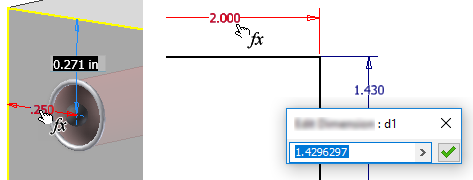
To reference other dimensions (parameters), select the feature to show the dimensions used to create it and click the dimension value you want to reference. Or, during sketching activity click another dimension to reference it.
Copy and Paste a Sketch
You can copy and paste a sketch from one face to another and from one component to another. Depending on the paste command you choose, user parameters will be copied and pasted.
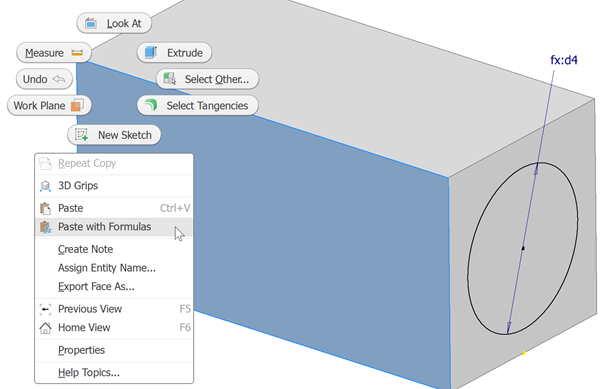
Select and right-click the source sketch, or simply right-click it, then click Copy.
Right-click the target face in the same or other component, and click:
- Paste to paste the sketch geometry and any related constraints.
- Paste with formulas to paste sketch geometry, related constraints, and user-defined parameters. Pasted user parameters are not duplicated.
Cancel a Sketch
When you cancel a sketch, all current actions are discarded. If creating a sketch, all actions are discarded including the creation of the sketch. If editing a sketch, all actions during that edit sketch operation are discarded.
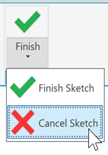
To cancel a sketch, on the Sketch tab click Cancel Sketch.
Finish a Sketch
You must finish a sketch to exit the sketch environment.
- To end a 2D sketch, on the Sketch tab click Finish Sketch
 or right-click in the graphics area and choose Finish 2D Sketch.
 - To end a 3D sketch, on the 3D Sketch tab click Finish Sketch or right-click in the graphics area and choose Finish 3D Sketch.
Delete a Sketch
Select the sketch in the browser and press Delete or right-click it and choose Delete.
Note: If the sketch is part of a feature you can also delete the feature.