Jump to:
Status
The Status tab displays a number of properties about the part.
- Status: Indicates whether the mesh is closed and oriented.
Note: Shows a warning symbol,
 , or a checkmark,
 , to indicate whether the condition is fulfilled. Shows a blue question mark,
 , if the check has not been run or not been updated. Click
Update in the
Statistics section, or set the checkbox
Auto-update to always check immediately when some change is detected that could affect those statuses.
, if the check has not been run or not been updated. Click
Update in the
Statistics section, or set the checkbox
Auto-update to always check immediately when some change is detected that could affect those statuses.
- Statistics: Lists details about the number of edges, border edges, triangles, inverted orientation, shells, and holes on the part. Figures in gray indicate that they may not be up to date after a change that could affect those values.
Also holds the controls to update or auto-update status and statistics. For very complex parts, automatic checking is potentially too calculation-intensive, switching to manual checking could improve performance.
- Highlighting: The highlighting section contains controls for making certain features of the part stand out more. Available features to highlight are holes, triangles, edges under a threshold angle, degenerate faces, and errors in general.
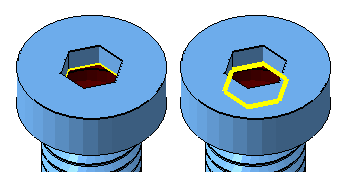
Highlighting errors in general draws a thicker line, and also draws it always on top.
Actions
The Actions tab offers a few details about the part features and also presents several commands to help repair your part.
- Close holes: Reports the number of border edges and holes in the part. Provides functionality to quickly stitch triangles or remove trivial or all holes.
- Flipped triangles: Reports the number of triangles with an inverted orientation and provides functionality to quickly fix any flipped triangles.
- Self-intersections: Provides functionality to detect, split-off, or remove self-intersecting triangles.
Additional repair commands on the Actions tab include Remove double triangles, Remove degenerate Faces, and Wrap part surface.
TopRepair scripts
On this tab you run, edit, create, and save repair scripts to quickly perform a series of repair operations to your part.
- (script dropdown): Lists available repair scripts. If you opened repair on a part from a loaded machine workspace, and the associated My Machines record has a repair script assigned, it appears here prominently as first choice instead of the default, built-in scripts.
- New script
- More actions
- Load script: Prompts to import a repair script from a REPAIR-type file
- Save current script: Prompts to export the selected script to a REPAIR-type file
- Duplicate script: Clones the selected script
- Rename current script: Prompts you to provide a new name for the selected script.
Note: Default scripts cannot be renamed.
- Delete script: Deletes the currently selected script.
Note: Default scripts cannot be deleted.
- (Script listing): Access and, if available, adjust individual actions of the script.
Double-clicking the green checkmark immediately executes the action.
Double-clicking the red X mark immediately deletes the action without prompt.
Shells
The Shells tab displays a number of properties about the shells that make up the part
- Triangle counts
- Surface area
- Bounding box volume
- Part volume
- Watertightness
- Orientedness
- Bounding box size
Left-clicking entries selects the respective shell or shells if Auto-select is checked. If unchecked, even clicking on entries does not destroy your existing selection.
Right-clicking on an entry or a range of entries always selects the shell or shells corresponding to the selection in the Shells list.
 Toggle selection.
View
The View tab provides a number of options to control the visualization of the part features and the selection of surfaces.
- Part: Switches for showing textures (unavailable if the part has no texture) and for viewing the part transparently are located here.
- Show slim faces: Provides functionality to color or highlight edges of triangles that are particularly narrow. The slider is used to define the maximum value for the smallest of the inner angles a triangle may have to be considered slim and therefore highlighted. If there are any such triangles present, and in case they do not immediately stand out,
Netfabb also displays this with
Status for Optimization Utility and an icon,
or
. Triangles too narrow can cause
Optimization Utility, which operates on a tetrahedral volume mesh to lattice or to lightweight parts, to retriangulate the input surface as this could otherwise produce less reliable results. You cannot control this remeshing in any way except choosing not to, so it can be beneficial to test for this during repair and possibly remesh the part before sending it over.
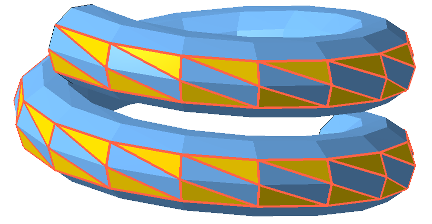
Triangles with their smallest inner angle being smaller than a threshold are highlighted.
- Surface selection: When you use the
 Surfaces mode from the menu, and you click a particular triangle, any adjacent triangle that is angled away from the previous one up to this angle becomes selected as well. This is useful for selecting surfaces up to a hard edge, for example, where you would not want a surface selection to bleed into areas you do not want to select.