Jump to:
Introduction
Lua is
Netfabb's method of choice to facilitate automation tasks inside the software, available in
Netfabb
Ultimate and
 Netfabb
Premium. One particular advantage is that a Lua script may work on entirely different parts and project than currently loaded in
Netfabb, if any.
Supported Lua scope
Netfabb employs version 5.1 of the Lua language definition, see: http://www.lua.org/manual/5.1/
Of the Lua 5.1 standard, Netfabb supports the core language specification as well as selected libraries.
|
Lua library |
Support |
Note |
|---|---|---|
|
Base |
Yes, with exceptions |
Some exceptions:
|
|
Coroutine manipulation |
Yes |
|
|
Modules |
No |
Use system:executescriptfile() |
|
String manipulation |
Yes |
|
|
Table manipulation |
Yes |
|
|
Mathematical functions |
Yes |
|
|
Input and output facilities |
No |
|
|
Operating system facilities |
No |
|
|
Debug library |
No |
For Lua in the Netfabb default 3D view, also referred to as desktop automation, a debugger GUI is available. |
Lua API reference
The objects, properties, and methods available in Netfabb's Lua implementation are documented in their own section in the online help.
TopAPI scopes
Netfabb's Lua capabilities are split into scopes. In the Netfabb Lua API reference (https://help.autodesk.com/view/NETF/2025/ENU/?guid=NETF-LUA-APIREF), the different scopes are indicated with these tags where necessary.
| Scope | Purpose | API reference tag |
|---|---|---|
|
Desktop automation, 3D parts, GUI |
Automate steps in regular 3D workflow, optionally with custom GUI dialogs, optionally involving the current buildroom or any parts present within it |
[Desktop Automation] |
|
Slices |
Automating the generation and modification of slice stacks similar to desktop automation but focused on work within the Slices project tree section |
[Slices] |
|
Selective Space Structures |
Algorithmic control of application of lattice structures to 3D geometry |
[3S] |
Lua script library
Desktop automation only: To make Lua scripts available for execution within Netfabb they are stored in a library, that means creating and editing, or loading them from files, and then storing them internally. The library resides in Netfabb's settings database. The library provides several functions:
- If running Lua scripts happens often during working with
Netfabb, set any script in the library to appear in a dropdown menu in the toolbar.
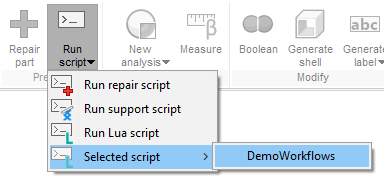
The icon in the toolbar makes Lua scripts readily available.
- The library provides a
Debugger to have a closer look at the operation of a script. You can run one line at a time, observe variables, set breakpoints to halt execution at specified steps, and observe output written for logging purposes.
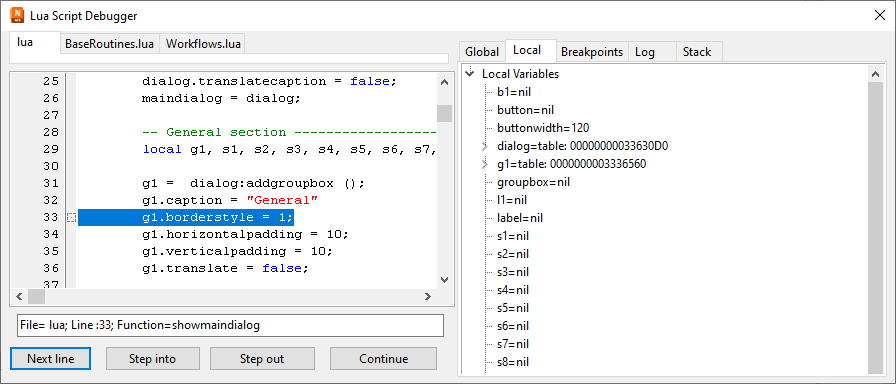
Stepping through a script can help with identifying mistakes
- If Netfabb's settings database is made available on a network, the scripts become available for all connected Netfabb installations.
Lua scripts for slicing and 3S do not make use of a library. For slicing, they are always loaded from files, authored externally. For 3S, they are authored individually per project in a dedicated editor GUI in Netfabb.
TopScript examples
Netfabb includes a number of example scripts that demonstrate how to address a variety of tasks with Lua. These can be found in the library as well as at Examples\LUA Scripts in the Netfabb installation directory. Some of them may require modification to meet your particular installation and paths.
Noteworthy examples are the scripts DemoApplication and DemoWorkflows. Both are full applications written in Lua and run within Netfabb. They implement a selection from the example scripts and make them available via GUI to demonstrate not only the use of such scripts but also how to implement a GUI to collate such functions. They are two of the default scripts loaded in the library.
Top