해석 모델링의 컨텍스트에서 새로 개발된 API를 살펴봅니다.
- 원하는 대로 해석 모델링을 통해 전체 시스템으로 간주되는 건물/구조 및 구조 요소와 관련하여 각각의 설계 결정을 반영할 수 있습니다.
- 모든 유형의 구조를 해석적으로 나타낼 수 있습니다.
- Revit 모델에서 구조 해석 작업을 수행할 수 있도록 일관된 해석 모델을 작성할 수 있습니다.
- 해석 소프트웨어를 사용하여 전체 양방향 워크플로우를 수행하고 모델 수정 사항을 캡처할 수 있습니다.
- 필요한 경우 해석 모델이 예기치 않게 변경되지 않도록 방지할 수 있습니다.
- 다양한 해석 유형 및 구성을 반영하는 여러 해석 모델을 작성할 수 있습니다.
- BIM 플랫폼을 지원하는 파라메트릭 및 협업 기능과 함께 전용 구조 해석 소프트웨어가 제공하는 해석 모델링의 용이성을 완벽히 제공합니다.
새 API를 사용하는 Revit 요소
새 API 클래스
AnalyticalElement - 모든 해석 객체에 대한 기준 클래스를 나타냅니다. AnalyticalModel을 대치합니다.
-
Transform GetTransform () - Returns the transform which reflects Analytical Element orientation.
-
AnalyzeAs AnalyzeAs - This represents the Analyze As parameter assigned to Analytical Element.
-
Reference GetReference (AnalyticalModelSelector selector) - Returns a reference to a given curve within the Analytical Element.
-
ElementId MaterialId - Defines the Material Id for the Analytical Element.
AnalyticalMember - 구조 해석 모델의 선형 요소를 나타냅니다. AnalyticalModelStick 및 AnalyticalModelColumn을 대치합니다.
-
AnalyticalMember Create(Document aDoc,Curve curve) - Method which creates a new instance of an Analytical Member within the project.
-
AnalyticalStructuralRole StructuralRole - The structural role assigned to the Analytical Member.
-
Curve GetCurve () - Returns the curve of the Analytical Member.
-
void SetCurve(Curve curve) - Sets the curve for the Analytical Member. This method disconnects elements from other analytical elements (if the end nodes are in the same position).
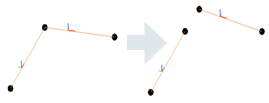
If the user wants to move the corner, and keep the connection, there are other ways for achieving that such as ElementTransformUtils.moveElements.
-
bool IsValidCurve(Curve curve) - Verifies if the curve is valid for an Analytical Member.
-
void FlipCurve() - Flips the ends of the Analytical Member.
-
StructuralSectionShape StructuralSectionShape - The structural section shape of the Analytical Member (read only).
-
ElementId SectionType - The id of the type from the structural family assigned to the Analytical Member.
-
double CrossSectionRotation - Cross-section rotation of the Analytical Member.
-
AnalyticalPanel Create(Document aDoc, CurveLoop curveLoop) - Method which creates a new instance of an Analytical Panel within the project.
-
CurveLoop GetOuterContour() - Returns the Curve Loop that defines the geometry of the Analytical Surface element.
-
bool IsCurveLoopValid(CurveLoop profile) - Checks if curve loop is valid for Analytical Panel.
- 해석 패널 형상을 수정하려면 SketchEditScope 프레임워크를 사용해야 합니다. 이 기능은 다음과 같은 새로운 방법으로 향상되었습니다.
-
void StartWithNewSketch(ElementId elementId) - Starts a sketch edit mode for an element which, at this moment, doesn't have a sketch.
-
- 형상을 편집하는 또 다른 방법은 다음과 같습니다.
-
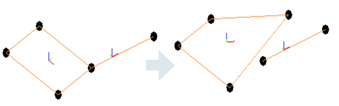
void SetOuterContour(CurveLoop outerContour) - Sets the Curve Loop that defines the geometry of the Analytical Surface element.
-
AnalyticalMember와 마찬가지로 해석 패널에 대한 등고선을 설정하면 다른 해석 요소와의 연결이 끊어집니다. 사용자가 구석을 이동하고 연결을 유지하려는 경우 ElementTransformUtils.moveElements와 같은 다른 방법으로 이를 달성할 수 있습니다.
-
- 해석 패널 형상을 수정하려면 SketchEditScope 프레임워크를 사용해야 합니다. 이 기능은 다음과 같은 새로운 방법으로 향상되었습니다.
-
ISet<ElementId> GetAnalyticalOpeningsIds() - Returns the Analytical Openings Ids of the Analytical Panel.
-
ElementId SketchId - Sketch associated to this Revit element.
-
AnalyticalStructuralRole StructuralRole - Structural role assigned to the Analytical Panel.
-
AnalyticalOpening Create(Document doc, CurveLoop curveLoop, ElementId panelId) - Method which creates a new instance of an Analytical Opening within the project.
-
CurveLoop GetOuterContour () - Returns the Curve Loop that defines the geometry of the Analytical Surface element.
-
bool IsCurveLoopValidForAnalyticalOpening(CurveLoop loop, Document aDoc, ElementId panelId) - Checks if curve loop is valid for Analytical Opening.
- 해석 개구부 형상을 수정하려면 SketchEditScope 프레임워크를 사용합니다.
- 해석 개구부 형상을 수정하는 또 다른 방법은 다음과 같습니다.
-
void SetOuterContour(CurveLoop outerContour) - Sets the Curve Loop that defines the geometry of the Analytical Surface element.
-
-
ElementId PanelId - ElementId of the host Analytical Panel.
-
ElementId SketchId - Sketch associated to this Revit element.
AnalyticalToPhysicalAssociationManager - 해석 요소와 물리적 요소 간의 연관을 관리합니다. 이전에는 요소 자체가 서로를 알고 있었고 사용자가 이러한 요소를 제어할 수 없었습니다(연관은 수정할 수 없음). 이 새로운 접근 방식을 사용하면 연관을 편집할 수 있습니다. 1-1 연관이 지원되며 요소는 동시에 여러 연관의 일부가 될 수 없습니다.
-
 AnalyticalToPhysicalAssociationManager GetAnalyticalToPhysicalAssociationManager(Document doc) Returns the AnalyticalToPhysicalAssociationManager for this
document.
-
void AddAssociation(ElementId analyticalElementId, ElementId physicalElementId) - Adds a new association between an analytical element and a physical element.
-
void RemoveAssociation(ElementId elementId) - This method will remove the association for the element with the given ElementId.
-
ElementId GetAssociatedElementId (ElementId elementId) - Returns id of the element which is associated with the given ElementId.
-
bool HasAssociation(ElementId id) - Verifies if the element has already defined an association.
-
AnalyticalNodeData GetAnalyticalNodeData ( Element element) - Returns AnalyticalNodeData associated with this element, if it exists.
-
AnalyticalNodeConnectionStatus GetConnectionStatus () - Returns the Connections Status for an
Analytical Node.
AnalyticalLinks, BoundaryConditions 및 Loads가 새 요소에서 작동하도록 마이그레이션되었습니다. 이러한 요소와 관련된 API는 대부분의 경우 동일하게 유지됩니다. 부하에 대해 몇 가지 기능이 향상되었습니다.
-
LineLoad.Create(Document aDoc,ElementId hostElemId, XYZ forceVector1, XYZmomentVector1, LineLoadType symbol).
-
LineLoad.Create(Document aDoc,ElementId hostElemId, int curveIndex, XYZ forceVector1, XYZ momentVector1, Structure.LineLoadType symbol).
-
LineLoad.IsValidHostId(Document doc, ElementId hostElemId).
-
AreaLoad.IsValidHostId(Document doc, ElementId hostElemId).
-
AreaLoad.Create(Document doc, ElementId hostElemId, XYZ forceVector1, AreaLoadType symbol).
-
 PointLoad.Create(Document doc, ElementId hostElemId, AnalyticalElementSelector selector, XYZ forceVector, XYZ momentVector, AreaLoadTyp
symbol).
-
PointLoad.IsValidHostId(Document doc, ElementId hostElemId).
샘플
AnalyticalMember 작성
      using (Transaction transaction = new Transaction(document, "Create Analytical Member"))
               {
                  transaction.Start();
                  //create curve which will be assigned to the analytical member
                  Line line = Line.CreateBound(new XYZ(0, 0, 0), new XYZ(5, 0, 0));
                  //create the AnalyticalMember
                  AnalyticalMember analyticalMember = AnalyticalMember.Create(document, line);
                  analyticalMember.StructuralRole = AnalyticalStructuralRole.StructuralRoleBeam;
                  transaction.Commit();
                }
해석 패널 작성
 using (Transaction transaction = new Transaction(revitDoc, "Create Analytical Panel"))
         {
            transaction.Start();
            //create the curveLoop for the AnalyticalPanel element
            CurveLoop profileloop = new CurveLoop();
            profileloop.Append(Line.CreateBound(new XYZ(1, 1, 0), new XYZ(2, 1, 0)));
            profileloop.Append(Line.CreateBound(new XYZ(2, 1, 0), new XYZ(2, 2, 0)));
            profileloop.Append(Line.CreateBound(new XYZ(2, 2, 0), new XYZ(1, 2, 0)));
            profileloop.Append(Line.CreateBound(new XYZ(1, 2, 0), new XYZ(1, 1, 0)));
            //create the AnalyticalPanel
            analyticalPanel = AnalyticalPanel .Create(revitDoc, profileloop);
            transaction.Commit();
          }
물리적 요소와 해석 요소 간에 새 연관 추가
using (Transaction trans = new Transaction(doc, "AddAssociationBetweenPhysicalAndAnalyticalElements"))
 {
            trans.Start();
            ElementId analyticalElementId = ContextualAnalyticalModel.Utilities.GetSelectedObject(activeDoc, "Please select analytical element");
            ElementId physicalElementId = ContextualAnalyticalModel.Utilities.GetSelectedObject(activeDoc, "Please select physical element");
            //gets the AnalyticalToPhysicalAssociationManager for the current document
            AnalyticalToPhysicalAssociationManager analyticalToPhysicalManager = AnalyticalToPhysicalAssociationManager.GetAnalyticalToPhysicalAssociationManager(doc);
            if (analyticalToPhysicalManager == null)
               return Result.Failed;
            //creates a new association between physical and analytical elements
            analyticalToPhysicalManager.AddAssociation(analyticalElementId, physicalElementId);
            trans.Commit();
  }
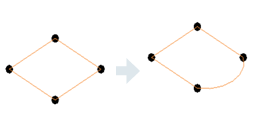
SketchEditScope 프레임워크를 사용하여 해석 패널의 경계 편집
             // Start a sketch edit scope
             SketchEditScope sketchEditScope = new SketchEditScope(document, "Replace line with an arc");
               sketchEditScope.StartWithNewSketch(analyticalPanel.Id);
               using (Transaction transaction = new Transaction(document, "Modify sketch"))
               {
                  transaction.Start();
                  //replace a boundary line with an arc
                  Line line = null;
                  Sketch sketch = document.GetElement(analyticalPanel.SketchId) as Sketch;
                  if (sketch != null)
                  {
                     //find first line in the sketch profile
                    …..
                  }
  	              // Create arc
                  XYZ normal = line.Direction.CrossProduct(XYZ.BasisZ).Normalize().Negate();
                  XYZ middle = line.GetEndPoint(0).Add(line.Direction.Multiply(line.Length / 2));
                  Curve arc = Arc.Create(line.GetEndPoint(0), line.GetEndPoint(1), middle.Add(normal.Multiply(20)));
                  // Remove element referenced by the found line.
                  document.Delete(line.Reference.ElementId);
                  // Model curve creation automatically puts the curve into the sketch, if sketch edit scope is running.
                  document.Create.NewModelCurve(arc, sketch.SketchPlane);
                  transaction.Commit();
               }
               sketchEditScope.Commit(new FailurePreproccessor());
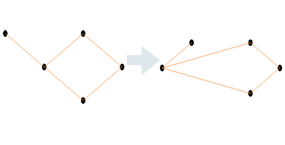
해석 노드 이동 및 연결 유지
            // Create Analytical Panel
            AnalyticalPanel analyticalPanel = CreateAnalyticalPanel.CreateAMPanel(document);
            // Create the connected Analytical Member
            AnalyticalMember analyticalMember = CreateAnalyticalMember.CreateMember(document);
            // Select the node
            Reference eRef = activeDoc.Selection.PickObject(ObjectType.PointOnElement , "Select an Analytical Node");

            // Move the Analytical Node using ElementTransformUtils
            using (Transaction transaction = new Transaction(document, "Move node with ElementTransformUtils"))
            {
               transaction.Start();
               ElementTransformUtils.MoveElement(document, eRef.ElementId, new XYZ(-5, -5, 0));
               transaction.Commit();
            }
해석 표면 등고선 점 가져오기
      private List<XYZ> GetSurfaceContourPoints( Document doc, ElementId elementId )
      {
         	// Create point list, get list of curves from analytical model
         	List<XYZ> contourPoints = new List<XYZ>();
         	AnalyticalModel analyticalModel = (doc.GetElement(elementId) as AnalyticalModel);
         	IList<Curve> curves = analyticalModel.GetCurves(AnalyticalCurveType.RawCurves);

         	// Iterate over curves and make the desired processing
         …...
        	return contourPoints;
      }
      private List<XYZ> GetSurfaceContourPoints( Document doc, ElementId elementId )
      {
         	// Create point list, get list of curves from analytical model
         	List<XYZ> contourPoints = new List<XYZ>();
         	AnalyticalPanel analyticalPanel = (doc.GetElement(elementId) as AnalyticalPanel);
          CurveLoop outerContour = analyticalPanel.GetOuterContour();

         	// Iterate over curves and make the desired processing
          …...
        	return contourPoints;
      }
실제 요소에 대한 연관된 해석 요소 가져오기
      AnalyticalElement GetAnalyticalElement(Element physicalElement)
      {
         AnalyticalElement analyticalElement = null;
         Document document = element.Document;
         AnalyticalToPhysicalAssociationManager assocManager = AnalyticalToPhysicalAssociationManager.GetAnalyticalToPhysicalAssociationManager(document);
         if (assocManager != null)
         {
            ElementId associatedElementId = assocManager.GetAssociatedElementId(physicalElement.Id);
            if (associatedElementId != ElementId.InvalidElementId)
            {
               Element associatedElement = document.GetElement(associatedElementId);
               if (associatedElement != null && associatedElement is AnalyticalElement)
               {
                  analyticalElement = associatedElement as AnalyticalElement;
               }
            }
         }
         return analyticalElement;
      }
선 경계 조건 작성
이전 솔루션을 사용할 경우:
        private BoundaryConditions CreateLineBC(Element hostElement)
        {
										    Document createDoc = hostElement.Document.Create;

             	// use Document.NewLineBoundaryConditions Method
              BoundaryConditions createdBC =
                    createDoc.NewLineBoundaryConditions(hostElement.GetAnalyticalModel(), 0, 0, 0, 0, 0, 0, 0, 0);

            return createdBC;
        }
새 솔루션을 사용할 경우:
      private BoundaryConditions CreateLineBC(Element hostElement)
      {
         Document createDoc = hostElement.Document.Create;

         // use Document.NewLineBoundaryConditions Method
         AnalyticalElement analyticalElement = GetAnalyticalElement(hostElement);
         BoundaryConditions createdBC =
                    createDoc.NewLineBoundaryConditions(analyticalElement, 0, 0, 0, 0, 0, 0, 0, 0);
         return createdBC;
      }