Create a Simplified Part
What's New: 2026
Use the Simplify command to reduce the content within a part by removing features, and excluding bodies. Start the command and refine the parameters that define the simplified model. As you select options, other options that are invalid are hidden.
The Simplify feature in the part environment allows you to use many of the same functions as in the assembly environment but the result creates a browser node. This means it will recompute as the geometry changes and can be controlled with Model states.
The Simplify command is not accessible when the model is in Express mode.
In the 3D Model tab
 Simplification panel, click
  Simplify. The Simplify property panel displays.
Optionally, select a built-in preset to use. Four built-in presets are provided, plus you can create your own. Presets assign values to the fields further in the property panel. You can override any value. Presets are shared with Assembly Simplify command.
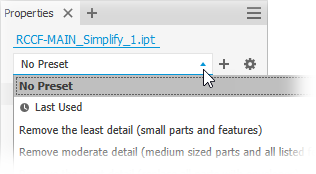
Remove the least detail (small parts and features) - the settings are designed to remove small parts and features, resulting in the most detailed model.
Remove moderate detail (medium sized parts and all listed features) - the settings are designed to remove a moderate amount of detail.
Remove the most detail (replace top-level components with envelopes) - the settings are designed to remove the greatest amount of detail resulting in very basic shapes.
No Simplification - the simplified version is full fidelity with respect to the assembly model. All details are visible in the model.
Tip: Select a preset close to what you want for detail, then use View Included and View Excluded to quickly select the remaining parts to expedite the process.The same method can be used for creating your own presets. For more information see To Work with Presets.
Replace with Envelopes provide the means to replace components with simple shapes. When you click on an option, the preview shows the parts represented as envelopes.
The replacement choices are:
 None - select this option when you are not using envelopes for the simplification.
 Whole Part - creates an envelope for the whole part. The result is imprecise and useful for developing a "keep out" area for the design. When this option is selected the Components and Features groups are hidden.
 Each Body - creates each body as its own envelope.
 Selected Bodies - selected bodies are replaced with envelopes.
When any of the replacement choices are selected, you can specify the Type:
- Orthogonal Bounding Box - creates the envelope in form of orthogonal bounding box.
- Oriented Minimum Bounding Box - creates the envelope in form of oriented bounding box.
- Oriented Minimum Bounding Cylinder - creates the envelope in form of oriented bounding cylinder.
Tip: Combine the use of Presets, Replace with Envelopes, Exclude Components, and Remove Features to refine the simplified model you want to output.Exclude Bodies - provides options for selecting bodies to be excluded from the simplified part.
Exclude bodies by selection (default). Exclude bodies by size is deselected and the Exclude selector is active.
Exclude Bodies by size
- Select the Exclude Bodies by size option.
- Specify the maximum diagonal value for a bounding box. Bodies that fit inside the bounding box are excluded. Use one of these methods to specify the size:
- Enter the value in the Max. Diagonal edit field.
- Click the arrow at the end of the value field to select a recently used value.
- Click the measure diagonal bounding box button
 then select a part/component to supply the diagonal value.
- Click
 Show excluded bodies to see the bodies that will not participate in the simplified model or
  Show included bodies to see the bodies participating in the simplified model. When you view in either mode, the numbers displayed in the edit field are relative to the label.
Remove Features provides options for selecting features by type and size to include in or exclude from the simplified part. The list of features include holes, fillets, chamfers, pockets (subtractive), embosses (additive), and tunnels (single and multiple entry).
Pocket recognizes subtractive features such as extrudes, revolves, sweeps, and so on.
Emboss recognizes additive or positive protrusions of various feature types.
Tunnel recognizes a set of faces contained inside the model that define an open area, having one or more entrances to the area from exterior faces.
For each of the listed feature types specify which you want to remove and the way you want to remove them:
- None (default) - no features of this type are removed.
 All - all features of this type are removed.
 Range - all features equal to or smaller than the specified parameter are removed. Specify the value that defines the maximum size to remove.
Preserve - click the selector and select the features you want to retain from those being removed.
Note: The rules for feature recognition are minimal allowing for crossover, for example, holes also meet the definition for tunnels. Thus, some holes outside of a range may be removed as Tunnels. To resolve this, you can click Preserve and select any feature you want to remain in the simplified part. Highlight displays a colored live preview of the feature removal.
Advanced Properties provides other settings that help manage the simplify output.
- Remove internal bodies selected by default. Inventor looks at the model from 14 standard directions (six orthographic and eight isometric) to determine bodies visibility state. Bodies deemed not visible are removed.
Click OK to create the simplified part from the specified criteria.