Modifies catalog content to customize part information.
You can add and remove parts from a catalog and change part properties, including part dimensions for use in AutoCAD Plant 3D toolset modeling.
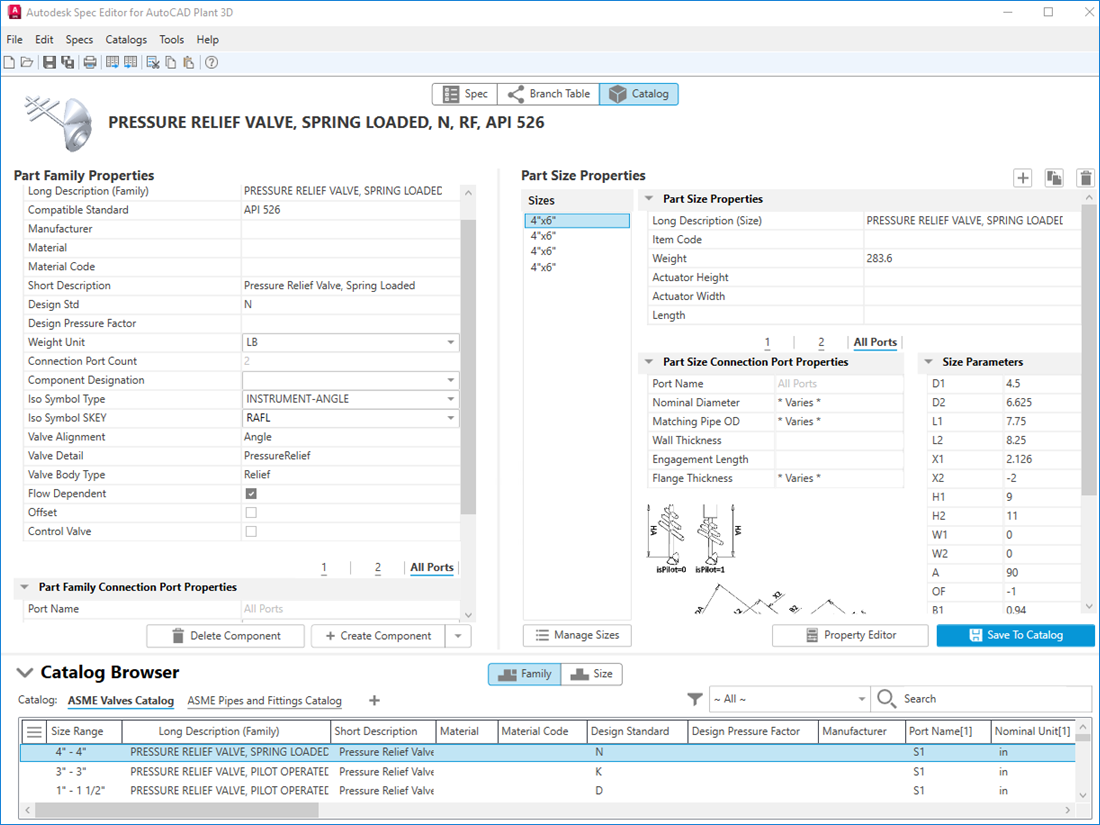
Part Family Properties
Sets part family property values, such as manufacturer and design standard. Modified property values are not immediately updated in the Catalog Browser. To set property values, apply them to the parts selected in the table or add a copy of the parts to the catalog.
- Part Family Connection Port Properties
- Sets values that define how the part connects to pipe or pipe components. You can set values for individual ports or all ports.
Delete Component
Removes the parts selected in Catalog Parts table.
Create Component
Adds a new component into the catalog.
Duplicate Component
Duplicates an existing component into the catalog.
Part Size Properties
Sets part size property values for individual sizes. Modified property values are not immediately updated in the Catalog Browser. To set property values you must apply them to the parts selected in the table or add a copy of the parts to the catalog.
- Part Size Connection Port Properties
- Sets values that define how the part connects to pipe or pipe components. You can set values for individual ports or all ports.
- Size Parameters
- Specifies whether you can set dimensions. Not all parts support setting dimensions.
- Add Button
- Adds a size for the selected component.
- Duplicate Button
- Duplicates an existing size for the selected component.
- Remove Button
- Deletes a size for the selected component.
Manage Sizes
Refines the selection of sizes to include in the catalog. Additionally, edits the dimensions for each individual size.
Property Editor
Displays the Catalog Property Editor dialog box to edit properties.
Save to Catalog
Save modified property values to the selected items in the catalog.