This dialog allows you to import or update the network from a JSON file.
To display this dialog:
- Right-click a checked out network/control data set in either the Explorer window or Model Group window, then select Update
 From JSON.
- Click the Update network/control from JSON button in the Task Sequence editor.
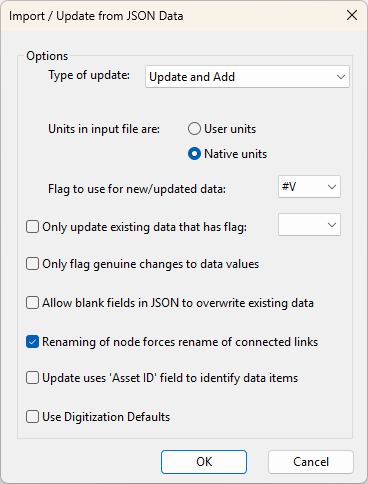
| Item | Description | ||||||
|---|---|---|---|---|---|---|---|
|
JSON File |
Clicking the ellipsis button displays a standard File Open dialog, which allows you to select a JSON file that you want to update from. Note: This option is only available when the Import / Update From JSON Data dialog is accessed from the
Task Sequence editor.
|
||||||
|
Type of update |
|
||||||
|
Unspecified units are: |
|
||||||
|
Flag to use for new / updated data: |
This flag should be used for new or updated data added to the network from the JSON file. You can either use the default #V flag, or a flag you have created in advance using the User Defined Flags dialog. The chosen flag is used if the JSON field does not have a corresponding flag field. If the JSON data contains a flag field, the flag from the JSON is used, even if the flag is unset. |
||||||
|
Only update existing data that has flag: |
You can choose to update only the data in your network that has the flag specified here. |
||||||
|
Only flag genuine changes to data values |
Does not set the flag if the updated parameter has not changed. |
||||||
|
Allow blank fields in JSON to overwrite existing data |
Do not check this box if your JSON data includes only data that has changed and you want other fields left as they are. Fields that are not listed in the JSON file are ignored completely. Only fields that are listed in the JSON are affected. |
||||||
|
Renaming of node forces renaming of connected links |
Check the box if your node names have changed and you want to maintain connectivity information. If you do not choose this option you will lose the following connections for nodes whose names have changed:
|
||||||
|
Update uses Asset ID field to identify data items |
If checked, the Asset ID field of the object in the database is used instead of the object's InfoWorks WS Pro ID (NodeID or USNode.DSNode.Suffix for example) when applying changes to existing records and identifying duplicate records. |
||||||
|
Use Digitization Defaults |
If checked, digitisation default values are used for fields of added network objects that do not already have a value in the JSON file. |
||||||
|
Save |
Saves all the selected options in the dialog, and adds them in the task sequence. Note: This option is only available when the Import / Update From JSON Data dialog is accessed from the
Task Sequence editor.
|