When changes have been made to the network/control, this option will create selection lists with things that have changed.
Checking the box will enable a particular selection list, which will be created when you run the task in the Task Sequence.
If you have an automatic model build, this will allow you to manually check the changes that the model builder has made.
This dialog is displayed when you click the Validation Selection Set button in the Task Sequence editor.
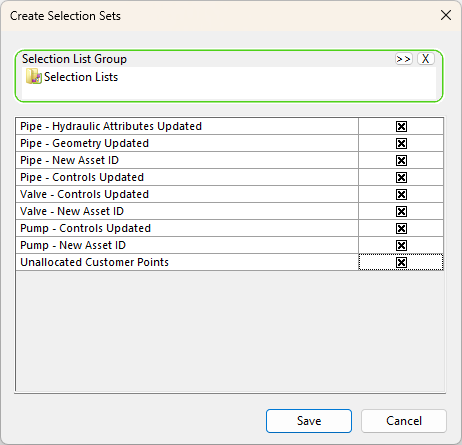
| Item | Description |
|---|---|
| Selection List Group | Use drag and drop or the Browse button to add a Selection List object in the dialog. |
|
Pipe - Hydraulic Attributes Updated Pipe - Geometry Updated Pipe - New Asset ID Pipe - Controls Updated Valve - Controls Updated Valve - New Asset ID Pump - Controls Updated Pump - New Asset ID Unallocated Customer Points |
Select the item by checking the box. |