The Edit Task dialog allows you to add or edit a task in the Task Sequence editor.
This dialog is displayed when you click the Edit button, or click any of the Insert Task option in the Task Sequence editor.
This dialog allows you to insert a supported object that you want to add in the task sequence, or edit a task in the current task sequence. Also, you can add or edit the name and comment for the selected task.
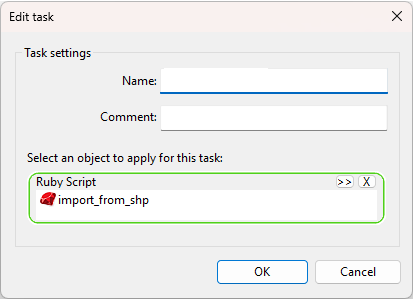
| Item | Description |
|---|---|
| Name | Allows you to specify the name that will be displayed in the Task Sequence editor. |
| Comment | Allows you to input a comment that will be displayed in the Task Sequence editor. |
| Select an object to apply for this task | Use drag and drop or the Browse button to add a supported object in the task sequence. |