Use the Export Data tool to save your analysis result data as an *.xlsx file.
At the top right of the Analysis Results page, click  Export Data.
The Export settings panel opens.
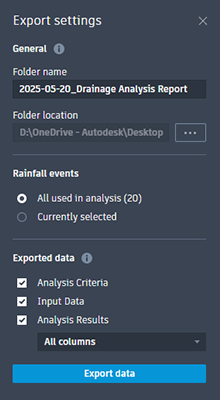
- Under General, specify a folder name and location for the exported files.
- Under Rainfall events, select which rainfall events to be exported with the analysis data. Each event will create a new *xlsx file.
- All used in analysis will export every rainfall event used by the analysis. The total number of rainfall events is shown in parentheses.
- Currently selected will export the Rainfall Event specified at the top of Analysis Results.
- Under Exported data, specify what data to include in the exported results. This data appears as sheets in the created *.xlsx file.
- Analysis Criteria includes rainfall analysis criteria used for the analysis: Rainfall Type, Rainfall Set, Rainfall Event, Duration and Run Time.
- Input Data includes all Time Area Runoff data in the analysis.
- Analysis Results includes all results:
- Drainage System Results (totals)
- Connection Results
- Catchment Results
- Structure Results
- Stormwater Control Results
Click Export data to generate the files.