3DGS (3D Gaussian Splats) files can be imported in three different file formats: PLY, SPZ, and LCC.
- File menu > Import > Import > Select File To Import
Interface: PLY and SPZ files
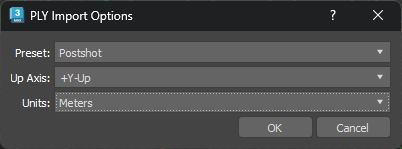
- Preset
- When importing from a specific application, choose the application from the drop-down list. Select from the following options:
Note: This option is only available when importing PLY files.
- Generic
- Select for a file created with a tool other than Postshot, Substance 3D, or World Labs.
- Postshot
- Select for a file created with Postshot, a third-party 3D scanning tool.
- Substance 3D
- Select for a file created with Adobe Substance 3D, a third-party tool.
- WorldLabs
- Select for a file created with World Labs, a third-party spatial intelligence and generative AI tool.
- Up Axis
- Defines what direction is "Up" in the scene you are importing, so your 3DGS data is loaded in the selected orientation. For PLY files you can select +Y-Up, -Y-Up, or Z-Up. For SPZ files, you can select Y-Up or Z-Up. Selecting the right
Up Axis imports your object correctly.
Note: PLY and SPZ file formats do not have a defined directional orientation, so it's important to consider the Up Axis to ensure the orientation of the 3DGS data is represented correctly in 3d Max.Note: 3DGS data can be generated in a way that doesn't naturally align to the 3D world, the XY axis, or the Z axis. In this case, you need to make manual adjustments to correct this in your scene.
- Units
- Defines the measurement units of the imported 3DGS data.
Note: The PLY and SPZ file formats do not specify a system of measurement units. Selecting Centimeters, Inches, Feet, or Meters scales the imported data in 3ds Max accordingly.
Interface: LCC files
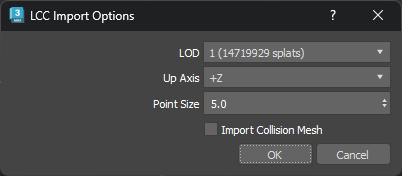
- LOD
- Lets you select the resolution of the 3DGS data.
- Up Axis
- Defines what direction is "Up" in the 3ds Max scene, importing your 3DGS data in the selected orientation.
Note: By default, LCC files have the same orientation as 3ds Max, +Y-Up.
- Point Size
- Lets you rescale the points on import.
- Import Collision Mesh
- When on, imports a collision mesh file that was generated alongside the 3DGS data.