Camera Tracker: Batch Track Rollout
The Camera Tracker utility's Batch Track rollout performs feature hands-off tracking once the trackers have been set up. You can set up a set of trackers, start a batch tracking of them all, and then use the other tools in this panel to check for and review detected tracking errors. This panel also checks for tracking completion.
 Utilities panel > Utilities rollout > More button > Utilities dialog > Camera Tracker > Batch Track rollout
Procedures
To review and correct tracking errors:
- Select an error in the list.
- Browse through the errors in sequence by repeatedly clicking Next, under the list.
- When you’ve selected an error, the associated tracker gizmo is selected and brought into view and the movie is set to the frame at which the potential error was detected.
- If there is indeed an error, adjust the gizmo in the Movie window to correct it, and place a new keyframe.
- If inspection shows that there isn't an error, the thresholds may be set too finely, so try adjusting the associated threshold and running Check Status again. This is often a good way to calibrate the thresholds for your scene, but be careful not to increase them too much and miss a real error.
- To clear an entry out of the list, click the Clear button. This is basically a cosmetic action that removes items from the list that you've either fixed or determined are not errors while working through the potential errors. If you perform a Check Status again, some of the errors may show up as well.
Interface
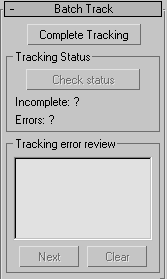
Complete Tracking
Searches for unknown positions in enabled trackers and undertakes tracking for those frames. It performs this optimally, and only tracks the frames for which enabled trackers have no position data.
Tracking Status group
Check Status
Scans for tracking errors and untracked frames. It displays two lines of information underneath it in the Status box.
Incomplete
Lists the tracker numbers with untracked frames in their active frame ranges.
Errors
Lists the tracker numbers containing one or more tracking errors as determined by the current error threshold settings.
Tracking Error Review group
Displays all the potential errors in a list. For each error the list shows a tracker number, error frame and details about the error. The details include a code identifying the thresholds and the error measure. These are the possible error codes:
- Me Match error threshold exceeded.
- Vd Color variance delta threshold exceeded.
- Jd Jump delta threshold exceeded.
In each case, the number following the code is the actual error measure. You can see how the error measure compares to the current thresholds in the Error Thresholds rollout. If you adjust the thresholds in this rollout and then rerun the Check Status again, the list is refilled with those points in the tracking that exceed the newly adjusted thresholds.
Next
Moves to the next error in the list.
Clear
Clears an entry out of the list.