Copy Biped Animation to Clip Dialog
The Copy Biped Animation To Clip dialog opens when you select one or more clips on a track and choose Load Source > From Biped on the Clips menu The animation from the biped replaces the selected clips.
- Select a biped. >
 Motion panel > Biped Apps rollout > Mixer > Motion Mixer dialog > Clips > Load Source > From Biped
Note: This dialog is available only for biped object mixes.
Interface
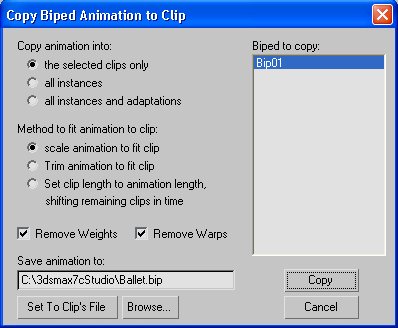
Copy Animation Into:
- The selected clips only Only the selected clip in the track is replaced by a new clip chosen from the reservoir.
- All instances Replaces instances of the clip (any occurrence of the selected clip within tracks for the same biped, or other bipeds of the same size) with the clip selected from the Reservoir.
- All instances and adaptations Replaces any occurrence (adaptation) of the selected clip on all bipeds' tracks in the Mixer, with the clip selected from the Reservoir.
Method to Fit Animation to Clip:
- Scale animation to fit clip Scales the length of the loaded clip to match the length of the clip it replaces in the track.
- Trim animation to fit clip Trims the length of the loaded clip to match the length of the clip it replaces in the track.
- Set clip length to animation length, shifting remaining clips in time For selected clips, changes the animation length to the loaded clip length. All clips on the track after the selected clip are shifted depending on the length of the newly loaded clip.
Remove Weights
Removes any existing weight curves from clips selected to be replaced.
Remove Warps
Removes any existing time warps from clips selected to be replaced.