Parameters
Use the Parameters selection level to access the PRS Parameters rollout which provides tools for creating and deleting keys. PRS stands for the three basic transform controllers: Position, Rotation, and Scale.
- Select an object > Motion panel > Parameters > PRS Parameters rollout
Procedures
To create a PRS transform key:
 Select an object in the viewports.
Drag the time slider to the frame where you want to place a key.
On the
 Motion panel, choose Parameters > PRS Parameters rollout.
Click one of the following buttons under Create Key PRS Parameters rollout:
Click Position to create a Position key.
Click Rotation to create a Rotation key.
Click Scale to create a Scale key.
If a particular Position, Rotation, or Scale controller doesn't use keys, then that button is not available under Create Key. For example, you can’t create Position keys if you're using a Noise Position controller.
Interface
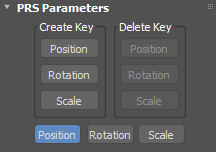
Create Key and Delete Key groups
Creates or deletes a move, rotate, or scale key at the current frame. These buttons become active or inactive depending on the existence of a key type at the current frame.
For example, if you're on a frame containing a Scale key, the Scale button is inactive in the Create column because a key already exists. At the same time, the Position and Rotation buttons are inactive in the Delete column because there are no keys of that type to delete.
Position/Rotation/Scale
Determines the contents of the Key Info rollouts that appear below the PRS Parameters rollout on the Motion panel.