Compass Helper
Compass displays as a non-rendering compass rose, with indicators for North, South, East, and West. A compass is part of a Daylight or Sunlight system; you create a compass automatically when you create sunlight. In a Sunlight system, the orientation of the compass indicates the orientation of the scene, relative to the path of the sun (the ecliptic).
 Create panel >
  (Helpers) > Standard > Object Type rollout > Compass
- Default menu: Create menu > Helpers > Compass
- Alt menu: Objects menu > Helpers > Compass
Use the Compass helper object if you want to create an orientation symbol in your scene, but don’t need to create a sunlight system.
Procedures
To create a compass object:
- On the Create panel, activate (Helpers), then on the Object Type rollout, click the Compass button.
- Click and drag to define the radius of the compass.
 Select and rotate the compass object to orient it.
Interface
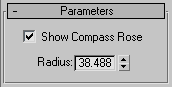
Parameters rollout
Show Compass Rose
Displays the non-rendering compass rose in the viewport.
Radius
Specifies the radius of the compass object.