Radiosity Preferences
On the Radiosity panel of the Preference Settings dialog, you set options for the radiosity solution.
- Default menu: Customize menu > Preferences > Preference Settings dialog > Radiosity tab
- Alt menu: Customize menu > Customization > Preferences > Preference Settings dialog > Radiosity tab
Interface
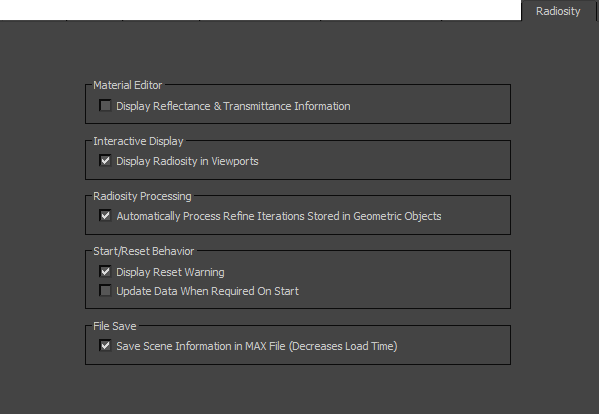
Material Editor group
Display Reflectance & Transmittance Information
When on, reflectance and transmittance values are displayed in the Material Editor.
Interactive Display group
Display Radiosity in Viewports
When on, radiosity effects are displayed in the viewports.
Radiosity Processing group
Automatically Process Refine Iterations Stored in Geometric Objects
When on, all refine iterations stored in geometric objects are automatically processed.
Start/Reset Behavior
Display Reset Warning
When on, a warning message is displayed whenever you reset the radiosity solution in your scene.
Update Data When Required on Start
When on, the radiosity engine must be reset and then recalculated if the solution is invalidated. In this case, the Start button changes to read Update & Start. When this is pressed, the radiosity solution is reset and the calculation starts over again.
When this toggle is off, the radiosity solution does not need to be reset if it is invalidated. You can continue processing your scene with the invalid solution.
File Save group
Save Scene Information in MAX file (Decreases Load Time)
The light levels from the radiosity solution are always saved with the file, however when this is on, some additional radiosity information is saved with your scene.