Interaction Mode Preferences
On the Interaction Mode panel of the Preference Settings dialog, you choose whether mouse and keyboard shortcut behavior matches earlier releases of 3ds Max, or Autodesk Maya.
- Default menu: Customize menu > Preferences > Preference Settings dialog > Interaction Mode tab
- Alt menu: Customize menu > Customization > Preferences > Preference Settings dialog > Interaction Mode tab
Specific customization settings for the mouse and keyboard shortcuts are on the Customize User Interface dialog > Mouse panel and Keyboard panel. When you change the interaction mode using this panel, settings on both the other panels change as well.
The 3dsmax.ini file saves the mode you choose, so this mode persists from one session of 3ds Max to the next.
Interface
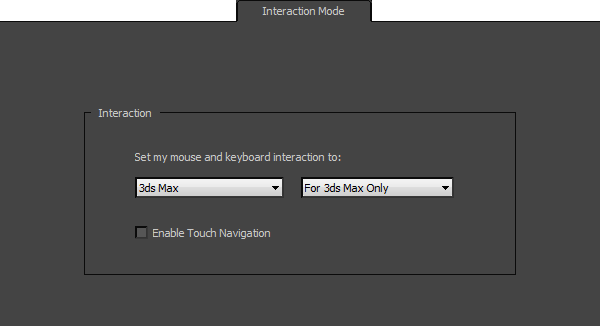
Select an Interaction Mode drop-down list
Choose the mode you want to use:
3ds Max (The default.) Mouse behavior and keyboard shortcuts behave in a "traditional" 3ds Max manner.
Maya Mouse behavior and keyboard shortcuts behave as they do in Autodesk Maya.
Among the Maya mode behaviors are:
Pressing
spacebarchanges focus to the view below the mouse, and maximizes that view.Shift+click either adds to or subtracts from a selection, whileCtrl+click subtracts from a selection.Orbit is not available in orthographic viewports.
While Zoom is active, dragging the mouse down and to the right (a "southeast" direction) zooms in.
The keyboard shortcuts for navigation tools are:
Orbit ("Arc Rotate")
Alt+ the left mouse button (does not work in Camera or orthographic viewports).Note: By default, several commands on the Ribbon and elsewhere in the 3ds Max interface useAlt+click orAlt+drag as shortcuts. When in Maya mode, this can give unexpected results.Pan
Alt+ the middle mouse button.Zoom
Alt+ the right mouse button (does not work in Camera viewports).
Alt+Homeswitches to a default Perspective view.
In addition, the following keyboard shortcuts have different default values:
3ds Max Maya Maximize Viewport Toggle Alt+WspacebarZoom Extents Selected ZFZoom Extents All Shift+Ctrl+ZAUndo Viewport Operation Shift+ZAlt+ZRedo Viewport Operation Shift+YAlt+YPlay Animation /(forward slash)Alt+VSet Key KSGroup [none] Ctrl+GEditable Poly > Repeat Last Operation ;(semicolon)G
[application drop-down list]
The only choice is For 3ds Max Only.
Enable Touch Navigation
When on, enables gestural input from multi-touch devices. Default=off.