3ds Max System Log
The system log contains important information about the status of 3ds Max, and can help users and system administrators monitor the application's status. By default, the system log is written to C:\Users\<user>\AppData\Local\Autodesk\3dsMax\<Max version>\<Max language>\Network\Max.log. The system log location can be queried with the MAXScript command logsystem.getNetLogFileName() (see "Log System" in the MAXScript Help).
The amount of data kept in the system log is specified on the File Preferences dialog.
A separate custom log can also be created per 3ds Max session, with content identical to that written to the system log, but at a user-specified location. This file is created when:
- 3ds Max is started with the -log command line option, specifying the name and location of the custom log.
- An environment variable called
ADSK_3DSMAX_SESSION_LOGexists, with a value specifying the name and location of the custom log.
The system log message format is space delimited and contains the following information:
- Date, Time
- Message Type: one of Debug (DBG), Information (INF), Warning (WRN) or Error (ERR)
- Process ID
- Thread ID
- Message string
3ds Max saves many different events to the log, including licensing system status, driver and plug-in loading, and script events.
The following script-related events are recorded in the system log:
| Event | Notes | Example |
|---|---|---|
| MAXScript loading | - All MAXScript scripts that are loaded are logged - Script types logged are: .ms (including startup.ms), .mse, .mcr, .mxs, and .mzp - If multiple scripts are loaded from a .mzp file (including nested .mzp files), they are all logged | 2021/07/05 11:39:28 INF: [14004] [19512] Loaded macroscript: C:\Program Files\3ds Max 2022\MacroScripts\Macro_AdvancedLighting.mcr |
| Python file loading | - All execution modes are logged, including scripts executed via -U PythonHost - The full script path and name are logged |
2021/07/06 14:00:11 INF: [27704] [29892] Executing python file: "c:\programdata\autodesk\applicationplugins\substancein3dsmax2022\scripts\post-startup\..\python\substance\SubstanceRendererCompatibility.py". |
| Python imports | - All imported Python modules are logged - Only the first import of a module is logged | 2021/07/06 13:59:26 INF: [27704] [29892] Importing python module "sys". |
| Plugin package loading | - All plugin packages loaded are logged - Plugin packages are logged when loaded at startup or when loaded via the Plugin Manager - The package metadata (name, company, version, and location) are logged | 2021/07/12 09:47:34 INF: [25320] [20972] Successfully loaded plugin package - Name: Autodesk 3ds Max Scene Security Tools - Company: Autodesk, Inc. - Version: 2.0.1 - Location: c:\programdata\autodesk\applicationplugins\3dsmaxscenesecuritytools\ |
Procedure
To view a max.log file in Microsoft Excel:
Start Excel, then open the log file.
You have to choose All Files (.).
Excel opens a Text Import Wizard.
At Step 1 of the wizard, choose Delimited.
At Step 2 of the wizard, click the checkbox to add Space to the set of delimiters.
At Step 3 of the wizard, accept the defaults.
Excel displays the log file in spreadsheet format.
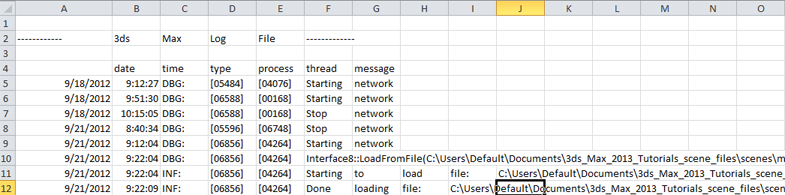 Tip: If the date (first column) or time (second column) displays as "#######", make the column wider.