Stroke Preferences Dialog
With the Stroke Preferences dialog you can save sets of strokes and set other stroke properties.
- Draw the Stroke Preferences stroke. By default, this is an inverse L, drawn vertically from bottom to top, and then horizontally from left to right.
- Set up a stroke to access the Stroke Preferences dialog > Use the stroke
Procedures
To access the Strokes Preferences dialog:
Set up strokes for your left or middle mouse button. See Strokes for information how to do this.
To define the stroke, hold down
Ctrland drag an inverted L shape (drag vertically from bottom to top, and continue from left to right).The name of this stroke is JGAB.
On the Define Strokes dialog, choose Stroke Preferences from the list.
Click OK to close the dialog.
Drag an inverted L shape to access the Strokes Preferences dialog.
Interface
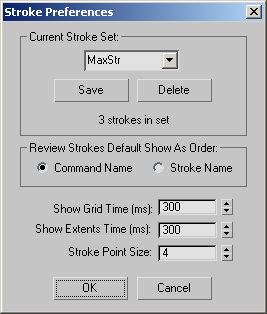
Current Stroke Set group
Displays the name and number of strokes in the current set.
- To create a new set, enter a new name in the field and click Save.
- To choose a different set, choose it from the list and click OK.
Save
Saves the set displayed in the list.
Delete
Deletes the set displayed in the list.
Review Strokes Default Show As Order group
Specifies whether commands or strokes are initially listed in the Review Strokes dialog.
- Command Name Displays the assigned strokes by command name (for example, Play Animation).
- Stroke Name Displays the assigned strokes by their stroke name (for example, HK).
Show Grid Time (ms)
The time it takes, in milliseconds, for the stroke analysis grid to appear in the viewports when you complete a stroke. Set it to 0 to hide the grid. Default=300 (about 1/3 of a second); Range=0 to 2000.
Show Extents Time (ms)
The time it takes, in milliseconds, for the extents of the stroke to appear in the viewports. Range=0 to 2000. Set it to 0 to disable this feature. Default=300 (about 1/3 of a second).
Strokes that operate on the First Point display a small X. Strokes that operate on items in the bounding box of the stroke display the bounding box. Strokes that operate on the circular extents display a circle that fits inside the square bounding box of the stroke. Window selections appear solid. Crossing selections appear dotted.
Stroke Point Size
The size, in pixels, of Xs drawn in the viewports that allow you to visualize the stroke shape. Default=4; Range=3 to 20.