Reviewing and Editing Strokes
You can view defined strokes in the Review Strokes dialog. Depending on how you display this dialog, you can also change or delete defined strokes.
Define Strokes dialog > Click Review.
Draw the Review Strokes stroke. By default, this is a horizontal line from left to right.
Click the Review button in the Define Strokes dialog to view strokes, but not change or delete them.
Draw the Review Strokes stroke (by default, a horizontal line from left to right) to view, change, and delete strokes. You can redefine the Review Strokes stroke in the Review Strokes dialog.
Procedures
To change the command assigned to a stroke (or vice versa):
- Select a command (or stroke) from the list.
- Click Change. The Define Strokes dialog appears.
- Select the new stroke to assign.
- Click OK in the Define Strokes dialog to assign the selected stroke to the command currently highlighted in the Review Strokes dialog.
Interface
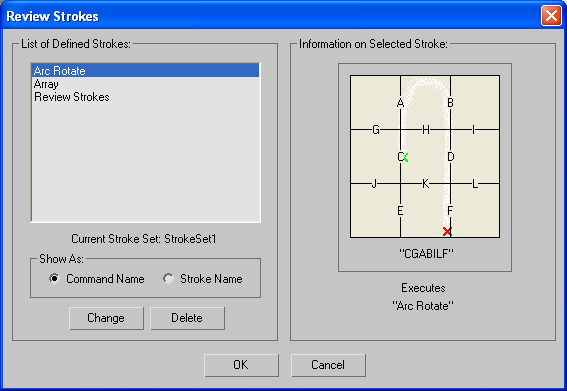
List of Defined Strokes group
Displays a list of commands that currently have strokes assigned to them and the name of the current stroke set.
Some commands are associated with particular methods: See Commands with Special-Purpose Methods.
Show As
Provides two options that specify how commands are displayed in the list.
- Command Name Displays the assigned strokes by command name (for example, Play Animation).
- Stroke Name Displays the assigned strokes by their stroke name (for example, HK).
Change
Assigns a different stroke to the command, or vice versa, depending on whether commands or strokes are displayed in the list.
Delete
Removes the selected command (or stroke) from the list, and the command is no longer assigned to the stroke.
Information on Selected Stroke group
Displays the name and shape of the stroke that is highlighted in the strokes list.