Inset Polygons (Polymesh)
Use these settings for insetting polygons in Interactive Manipulation mode.
- Select an Edit Poly or editable poly object. >
 Modify panel > Polygon sub-object level > Edit Polygons rollout > Inset >
  (Settings)
 - Select an Edit Poly or editable poly object. > Polygon sub-object level > Quad menu > Tools 2 quadrant > Inset > (Settings)
- Select an Edit Poly or editable poly object. > ribbon > Modeling tab > Polygon Modeling panel >
 (Polygon) sub-object level > Polygons panel > Shift+click
  (Inset) or choose Inset Settings from the drop-down list.
Interface
Inset Polygons uses the caddy interface when Enable Caddy Controls is on; when off, the standard settings dialog is used. For details on using the caddy controls, see The Caddy Interface.
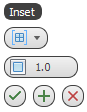
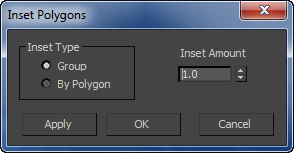
Left: the caddy interface; Right: the standard dialog
[Inset Type]
From the drop-down list or group box, choose the method for applying Inset to multiple selected polygons at once:
 Group The inset takes place across each selection of multiple, contiguous polygons.
 By Polygon Insets each polygon individually.
 Inset Amount
Specifies the amount of the inset in scene units.
_____
 OK
OK
Applies the settings to the current selection and closes the caddy. Keyboard equivalent: Enter
 Apply and Continue
Applies the settings to the current selection, retaining them for the preview if you then change the selection. Keyboard equivalent: Ctrl+Enter
 Cancel
Closes the caddy without applying the settings to the current selection. Does not reverse previous uses of Apply And Continue. Keyboard equivalent: Esc