Bevel Polygons (Polymesh)
Beveling involves first extruding polygons and then scaling the extruded polygons. Use these settings for beveling polygons in Interactive Manipulation mode.
- Select an Edit Poly or editable poly object. >
 Modify panel > Polygon sub-object level > Edit Polygons rollout > Bevel >
  (Settings)
 - Select an Edit Poly or editable poly object. > Polygon sub-object level > Quad menu > Tools 2 quadrant > Bevel > (Settings)
- Select an Edit Poly or editable poly object. > ribbon > Modeling tab > Polygon Modeling panel >
 (Polygon) sub-object level > Polygons panel > Shift+click
  (Bevel) or choose Bevel Settings from the drop-down list.
Interface
Bevel Polygons uses the caddy interface when Enable Caddy Controls is on. For details on using the caddy controls, see The Caddy Interface.
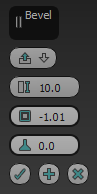
The caddy interface
[Bevel Type]
From the drop-down list, choose the method for beveling multiple polygons at once:
 Group Beveling takes place along the average normal of each contiguous group of polygons. If you bevel multiples of such groups, each group moves along its own averaged normal.
 Local Normal Beveling takes place along each selected polygon's normal.
 By Polygon Bevels each polygon individually.
 Height
Specifies the extent of the extrusion in scene units. You can extrude selected polygons outward or inward, depending on whether the value is positive or negative.
 Outline Amount
Makes the outer border of selected polygons bigger or smaller, depending on whether the value is positive or negative.
 Bias (Local Normal only)
When Local Normal is enabled, sets the bias for bevelling faces. A setting of 1 bevels faces along their original normal. When two or more faces share an edge, a setting of 0 biases the result toward the averages of the shared edges (the legacy behavior for Local Normal).
 OK
OK
Applies the settings to the current selection and closes the caddy. Keyboard equivalent: Enter
 Apply and Continue
Applies the settings to the current selection, retaining them for the preview if you then change the selection. Keyboard equivalent: Ctrl+Enter
 Cancel
Closes the caddy without applying the settings to the current selection. Does not reverse previous uses of Apply And Continue. Keyboard equivalent: Esc