Relax Modifier
The Relax modifier changes the apparent surface tension in a mesh by moving vertices either towards or away from their neighbors. This results in an object typically becoming smoother and somewhat smaller as the vertices move toward an averaged center point. The effect is most pronounced on objects that have sharp corners and edges.
 Modify panel > Make a selection. > Modifier List > Object-Space Modifiers > Relax
- Default menu: Make a selection. > Modifiers menu > Parametric Deformers > Relax
- Alt menu: Make a selection. > Modifiers menu > Geometry (Parametric) > Relax
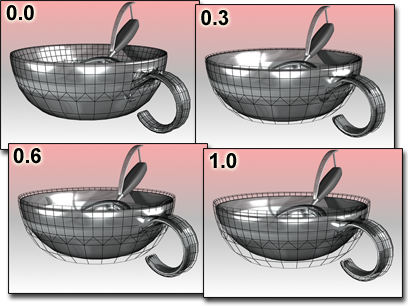
Relax moves the bowl away from its original contours.
When you apply Relax, each vertex is moved toward the average position of its neighboring vertices. A neighboring vertex is one that shares a visible edge with the current vertex.
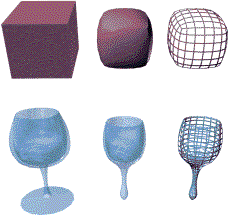
Original objects compared to relaxed objects
Patches
As of version 4, a patch object coming up the modifier stack is not converted to a mesh by this modifier. A patch object input to the Relax modifier retains its patch definition. If a file created by a previous version of 3ds Max contains a patch object applied with the Relax modifier, it will be converted to a mesh to maintain backward compatibility.
Interface
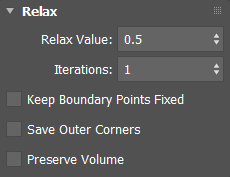
Relax Value
Controls how far a vertex moves for each iteration. The value specifies a percentage of the distance from the original location of a vertex to the average location of its neighbors. Range=–1.0 to 1.0. Default=0.5.
Positive Relax values move each vertex in closer to its neighbors. The object becomes smoother and smaller.
When the Relax value=0.0, vertices do not move and Relax has no affect on the object.
Negative Relax values move each vertex away from its neighbors. The object becomes more irregular and larger.
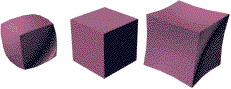
Relax Values=1.0, 0.0, –1.0
Iterations=1 (default)
Iterations
Sets how many times to repeat the Relax process. For each iteration, average locations are recalculated and the Relax Value is reapplied to every vertex. Default=1.
For 0 iterations, no relaxation is applied.
Increasing iterations for positive Relax Value settings smooths and shrinks an object. With very large iteration values, the object shrinks to a point.
Increasing iterations for negative Relax Value settings exaggerates and expands an object. With relatively few iterations, the object becomes jumbled and almost unusable.
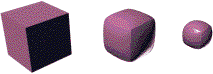
Iterations=0, 10, 50
Relax Value=0.5 (default)
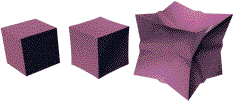
Iterations=0,1, 5
Relax Value=–0.5
Keep Boundary Pts Fixed
When enabled, controls whether vertices at the edges of open meshes are moved. Default=on.
When Keep Boundary Pts Fixed is on, boundary vertices do not move while the rest of the object is relaxed. This option is particularly useful when working with multiple objects, or multiple elements within a single object, that share open edges.
When this checkbox is off, all vertices of the object are relaxed.
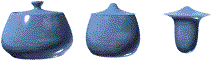
Keep Boundary Pts Fixed=on
Iterations=0, 10, 50
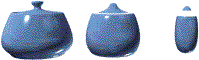
Keep Boundary Pts Fixed=off
Iterations=0, 10, 50
Save Outer Corners
When enabled, preserves the original positions of vertices farthest away from the object center.
Preserve Volume
When enabled, tries to maintain the original shape while relaxing the mesh.
This option is useful when cleaning up meshes with undesirable small surface details. Reducing such 'noisy' data can also improve the processing time of the Autodesk Retopology Tools for 3ds Max.