Noise Plus Modifier
Noise Plus is an advanced Noise modifier that provides many new features and functionality not possible with the legacy Noise modifier. It creates random surface variations using Simplex-based noise and expanded controls, allowing you to add natural-looking detail for modeling or animation. You can refine the noise pattern with fractal settings and strength controls, apply noise per element so each part of a mesh varies independently, and take advantage of built-in tiling support for creating seamless, repeatable noise patterns.
What Noise Plus does
Noise Plus deforms vertices (or applies displacement along normals) based on a configurable noise pattern. It uses Simplex noise by default and supports several fractal types so you can control the look and detail of the variation.
You can choose to evaluate the noise in object or world space, generate seamless tileable patterns for repeating surfaces, invert the result, and animate the effect over time using the Phase parameter. In addition to expanded fractal controls, Noise Plus offers support for different coordinate systems and the ability to drive displacement along object normals-enabling more precise, production-ready surface variation.
Noise Plus parameters
The modifier is organized into sections in the Modify panel.
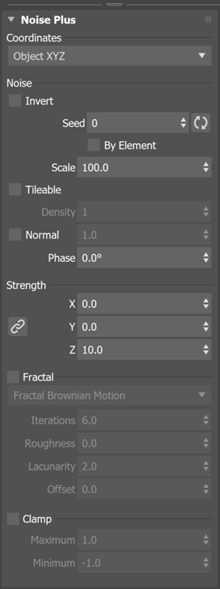
Coordinates
Chooses the coordinate system for the noise (for example, Object XYZ so the pattern is relative to the object's local axes).
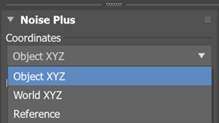
- Object XYZ: The noise is calculated relative to the object's local coordinate system. Because the pattern is tied to the object itself (including its local axes and normals), the result does not change when the object is moved, rotated, or scaled in the scene-the noise "sticks" to the object.
- World XYZ: The noise is calculated in world space. The pattern exists independently of the object, so as the object moves, rotates, or scales, it passes through the noise field and the surface result updates accordingly. This makes it useful for animated effects where the object appears to move through a procedural noise volume.
- Reference: The noise is generated relative to a specified reference object in the scene. The reference object defines the coordinate space for the pattern, letting you to control or animate the noise placement by transforming the reference object.
Noise
Invert: Reverses the effect of the noise (high and low values swap).
Seed: Controls the random pattern. Change the value or use the randomize button to get a different variation. Each seed produces a different but repeatable pattern.
By Element: When on, each element (a contiguous set of connected polygons) gets its own random seed so that each part of the mesh looks slightly different. Use this when you have many repeated pieces (for example, a stone path made with Array) and want to break up uniformity.
Scale: Controls the size/frequency of the noise pattern.
Tileable: When on, the noise pattern repeats seamlessly over the noise domain so you can create repeating surfaces without visible seams.
Note: Some fractal patterns do not support tiling.Density: Controls how tightly packed the noise features appear. It can be thought of by how many times it should repeat.
Normal: When on, noise is applied along the object's surface normals (or along Z for shape objects). When off, displacement follows the Strength X/Y/Z axes. The value sets the strength of this component.
Phase: Offsets the noise over time. Animate Phase to create moving or evolving noise (for example, for water or organic motion). in Noise Plus, the Simplex noise algorithm allows the Phase parameter to loop seamlessly-producing the same result at a value of 0 as at 360. This seamless looping behavior is not supported in the legacy Noise modifier. does not create phase keys automatically; you set keyframes as needed.
Strength
X, Y, Z: Set how much the noise moves geometry along each axis. A link control lets you keep X, Y, and Z in proportion when it is enabled. The default strength on a new modifier is 10.0 along Z so the effect is visible immediately.
The different fractal types
Fractal
Fractal type: Chooses the fractal method (for example, Fractal Brownian Motion). Different types change the character of the noise (smoother, ridged, terrain-like, and so on).
Iterations: Number of fractal layers. More iterations add detail but can slow the viewport.
Roughness: Controls how rough or smooth the fractal detail is.
Lacunarity: Controls how much frequency and amplitude change from one iteration to the next.
Note: Integer values work best when using in conjunction with the tiling option.Offset: Shifts the fractal pattern.
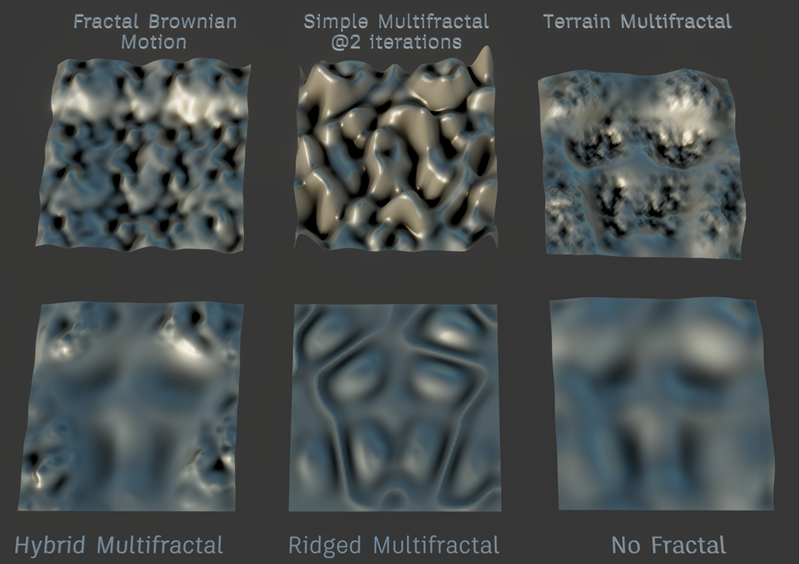
The different fractal types
Clamp
- Clamp: When enabled, limits the noise output to the range between Minimum and Maximum. Use this to avoid extreme displacement or to keep the effect within a predictable range.
- Maximum/Minimum: Upper and lower limits when Clamp is on.
How and when to use Noise Plus
- Modeling variation: Add surface variation to walls, terrain, or duplicated objects (for example, after using Array) so that each copy or region looks less uniform.
- Per-element variation: Enable By Element when you have multiple separate elements so each element gets a different noise pattern while sharing the same global settings.
- Animated noise: Animate the Phase parameter over time to create flowing or evolving deformation.
- Tileable surfaces: Enable Tileable when you need the noise to repeat without seams at the edges of the object.
- Localized effect: If you have a vertex selection or soft selection from a modifier below Noise Plus in the stack, the noise is applied according to that selection.