Weighted Normals Modifier
Weighted Normals improve the shading of models by altering the vertex normals to be perpendicular to the larger flat polygons. When used with the chamfer modifier with zero segments, shading is blended across the chamfered faces rather than across the whole model.
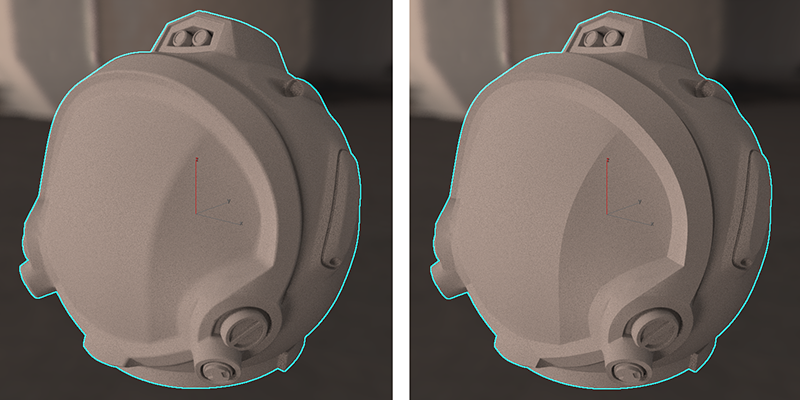
Space helmet before (left) and after using the Weighted Normals modifier.
Interface
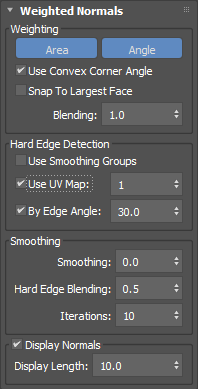
Weighting group
Area button
Enables weighting based on the face area. This setting can be enabled alone or in conjunction with Angle.
Angle button
Enables weighting based on the face corner angle. This setting can be enabled alone or in conjunction with Area.
Use Convex Corner Angle
Enables using a convex angle at concave corners.
Snap To Largest Face
Enables computation of normals based only on the face of the largest weight value. This setting will give different results based on whether the weighting calculated based on Area, Angle or both.
Blending
Sets the blending between weighted and unweighted normals. A value of 1.0 applies a fully-weighted calculation.
Hard Edge Detection group
These parameters are useful computing new normals based on existing mesh data, such as smoothing groups, UV seams, and hard angles.
Use Smoothing Groups
Enables the use of hard edges based on adjacent face smoothing groups.
Use UV Map
Enables the use of hard edges based on UV seams in the specified map.
By Edge Angle
Enables the use of hard edges based on the angle between adjacent face normals.
Smoothing group
Smoothing
Sets the blending between the area or angle weighting options. This may result in a slightly slower computation but will provide better results. A value of 1.0 applies a fully-smoothed calculation.
Hard Edge Blending
Sets the value for controlling smoothing at vertices on hard edges. This setting is available only if one or more hard edge detection options are enabled.
Iterations
Sets the maximum number of iterations for the smoothing process.
Display Normals
Enables the display of vertex normals in the viewport.
Display Length
Sets the length of the vertex normal vector.