Turn To Patch Modifier
The Turn To Patch modifier lets you apply object conversions in the modifier stack. Using the Turn To Patch modifier, you can fine-tune the conversion process such as turning quads into quad patches.
- Make a selection. >
 Modify panel > Modifier List > Object-Space Modifiers > Turn to Patch
 - Default menu: Make a selection. > Modifiers menu > Conversion > Turn to Patch
- Alt menu: Make a selection. > Modifiers menu > Edit/Convert > Turn to Patch
Procedures
Example: To collapse to quad patches:
- Create a chamfer box in wireframe:
 Create panel >
  (Geometry) > Extended Primitives > Object Type rollout > ChamferBox button.
 - Apply a Turn To Patch modifier: Modify panel > Modifier List > Turn To Patch.
- Right-click the stack display and choose Collapse All.
Interface
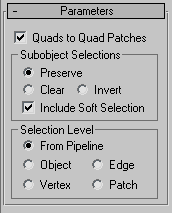
Quads to Quad Patches
Turns quad faces in meshes or polymeshes into quad patches.
Sub-object Selections group
These options control the selection of sub-objects.
- Preserve (The default.) Passes the sub-object selection up the stack. For example, if you have an object that you have converted from an editable mesh, and you've selected a polygon, then when you apply a Turn To Patch modifier, the patch, which is derived from the selected polygon, remains selected.
- Clear Clears the sub-object selection so that nothing is selected.
- Invert Inverts the sub-object selection. All sub-objects not currently selected are selected, and all sub-objects currently selected are deselected.
Include Soft Selection
When these are on, 3ds Max applies a spline curve deformation to unselected vertices surrounding the transformed selected sub-object. This provides a magnet-like effect, with a sphere of influence around the transformation. Use this when you want to preserve the soft selection from beneath. For example, if Use Soft Selection is on when you select vertices on an editable mesh, and you apply Turn To Patch with Include Soft Selection on, then the same soft selection will apply to the patch vertices. Default=on.
For more information, see Soft Selection Rollout.
Selection Level group
These options set the sub-object selection level for passing up the rest of the stack.
- From Pipeline Uses the equivalent of whatever the input object uses (patch level becomes face level, and so on). For example, if you create a box, convert it to an editable mesh in face mode, and apply a Turn To Patch modifier to it, 3ds Max passes a sub-object selection in patch mode up the stack. The Turn To Patch modifier takes the sub-object face selection into account and selects the patches that derive from the face selection.
- Object Uses object as the selection level for passing up the rest of the stack.
- Edge Uses edge as the sub-object selection level for passing up the rest of the stack.
- Vertex Uses vertex as the sub-object selection level for passing up the rest of the stack.
- Patch Uses patch as the sub-object selection level for passing up the rest of the stack.