Turn to Point Modifier
The Turn to Point Modifier turns any object with a vertex, like a mesh or a line, into a Points object type. You can use the Turn to Point modifier in combination with other point data manipulation tools like the Editable Point object type and the Point Select Modifier.
For more information on using Turn to Point in a workflow, see Create a forest using 3DGS data and the Turn to Point and Point Instance Modifiers.
 Modify panel > Make a selection > Modifier List > Object-Space Modifiers > Turn to Point
- Default menu: Make a selection > Modifiers menu > Conversion > Turn to Point
Tips
- Use the ESC key to interrupt long calculation times
Interface
Parameters rollout: Vertices to Points
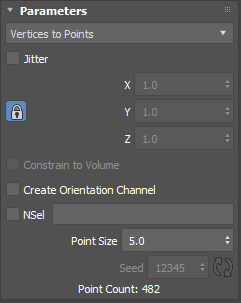
Vertices to Points takes all the existing vertices on the object Turn to Point is applied to and turns them into points, effectively turning a polygon object into a point object. The following parameters appear when Vertices to Points is selected in the drop-down list:
Jitter: Randomizes where the points are located on the object. Use the X, Y, and Z values to increase or decrease the randomization. Clicking
 enables the X, Y, Z Jitter axes to use the same value.
 Create Orientation Channel: Uses the vertex normals off each of the points as the orientation, letting you align other things to the surface of the Turn to Point object. For example, this workflow is useful for placing objects that need to follow the surface contour of another object, like moss attached to a rock or a fly sitting an object.
NSel: When on, creates a named selected set. Enter a name for the selection set in the empty field. A new selection set containing all the points created by Turn to Point is created.
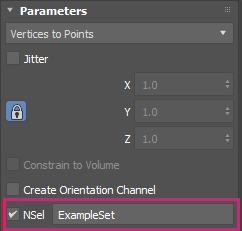
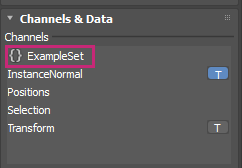
When the Turn to Point object is combined with another Editable Point object, the named selection set appears in the Editable Point parameters > Channels & Data rollout > Channels list.
Point Size: Sets the size of the generated points, making it easier to see the points if the point color blends with your background.
Seed: Click
 to randomize the seed value that is generated.
Point Count: A running total of the points in the selection.
Parameters rollout: Fill Volume
Fill Volume randomly distributes points based on an object's watertight representation of the geometry data. The following parameters appear when Fill Volume is selected in the drop-down list:
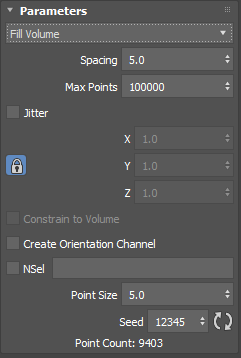
- Spacing: Controls the space between each of the points. Increasing the Spacing value introduces more space between points, which means fewer points are generated.
- Max Points: Limits the number of points Turn to Point can generate.
- Jitter: Randomizes where the points are located on the object. Use the X, Y, and Z values to increase or decrease the randomization.
- Create Orientation Channel: Uses the vertex normals off each of the points as the orientation, letting you align other things to the surface of the object that you are using with Turn to Point. For example, this workflow is useful for placing objects that need to follow the surface contour of another object, like moss attached to a rock or a fly resting on an object.
- NSel: When on, creates a named selected set. Enter a name for the selection set in the empty field. A new selection set containing all the points created by Turn to Point is created. When the Turn to Point object is combined with another Editable Point object, the named selection set appears in the Editable Point parameters > Channels & Data rollout > Channels list.
- Point Size: Sets the size of the generated points, making it easier to see the points if the point color blends with your background.
- Seed: Click to randomize the result that is generated.
- Point Count: A running total of the points in the selection.
Parameters rollout: Surface (Count)
Takes a surface, like a plane, and randomly distributes points on it according to the Total Count value. The following parameters appear when Surface (Count) is selected in the drop-down list:
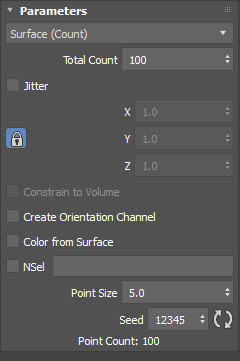
Total Count: The total number of points that are generated by Turn to Point.
Jitter: Randomizes where the points are located on the object. Use the X, Y, and Z values to increase or decrease the randomization.
Create Orientation Channel: Uses the vertex normals off of each of the points as the orientation, letting you align other things to the surface of the Turn to Point object. For example, this workflow is useful for placing objects that need to follow the surface contour of another object, like moss attached to a rock or a fly resting on an object.
Color from Surface: Lets you assign a map to a Turn to Point object. This assigned map affects the Color channel data that is generated.
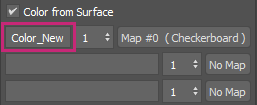
Channel Name: Lets you enter the name of the channel that is created on the Point object to store the color data:
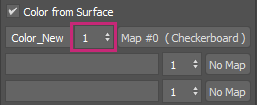
Map Channel: Lets you specify the map channel of the material:
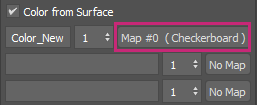
Map button: Lets you apply a material from 3ds Max:
NSel: When on, creates a named selected set. Enter a name for the selection set in the empty field. A new selection set containing all the points created by Turn to Point is created. When the Turn to Point object is combined with another Editable Point object, the named selection set appears in the Editable Point parameters > Channels & Data rollout > Channels list.
Point Size: Sets the size of the generated points, making it easier to see the points if the point color blends with your background.
Seed: Click
to randomize the result that is generated.Point Count: A running total of the points in the selection.
Parameters rollout: Surface (Density)
Takes a surface, like a plane, and randomly distributes as many points as possible up to the defined Max Points value. The following parameters appear when Surface (Density) is selected in the drop-down list:
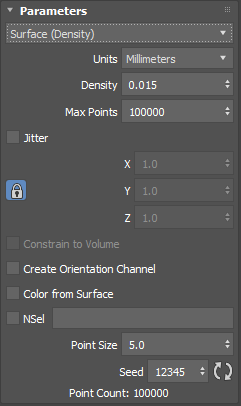
Units: Lets you select the unit type. Selecting a smaller unit type, like inches, generates more points than a larger unit type, like kilometers.
Density: Controls how the points are spaced. Larger values generate more densely packed points.
Max Points: Limits the number of points Turn to Point can generate.
Jitter: Randomizes where the points are located on the object. Use the X, Y, and Z values to increase or decrease the randomization.
Create Orientation Channel: Uses the vertex normals off each of the points as the orientation, letting you align other things to the surface of the object that you are using with Turn to Point. For example, this workflow is useful for placing objects that need to follow the surface contour of another object, like moss attached to a rock or a fly resting on an object.
Color from Surface: Lets you assign a map to a Turn to Point object. This assigned map affects the Color channel data that is generated.
Channel Name: Enter the name of the channel where the color data lives:
Map Channel: Lets you specify the map channel of the material:
Map button: Lets you apply a material from 3ds Max:
NSel: When on, creates a named selected set. Enter a name for the selection set in the empty field. A new selection set containing all the points created by Turn to Point is created. When the Turn to Point object is combined with another Editable Point object, the named selection set appears in the Editable Point parameters > Channels & Data rollout > Channels list.
Point Size: Sets the size of the generated points, making it easier to see the points if the point color blends with your background.
Seed: Click
to randomize the result that is generated.Point Count: A running total of the points in the selection.