Optimize Spline Modifier
The Optimize Spline modifier reduces the number of knots and adjusts their handles to optimally reproduce the original spline as closely as possible.
- Select a spline. >
 Modify panel > Modifier List > Object Space Modifiers > Optimize Spline
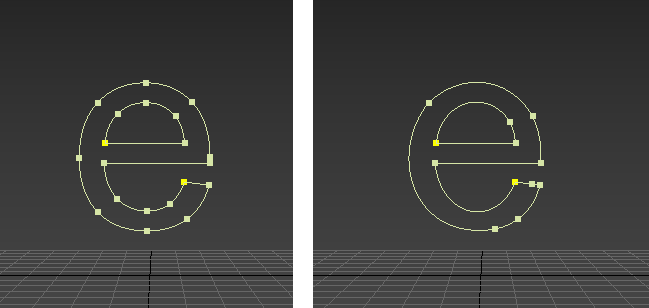
A Text spline before (left) and after an optimization of 40%. Note how the curves remain intact even with fewer knots defining them.
Interface
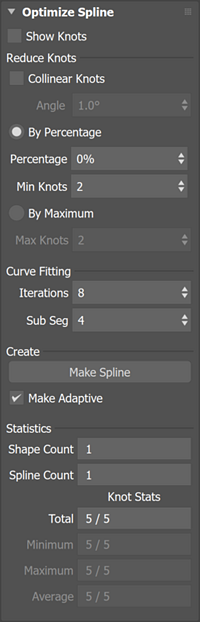
Optimize Spline rollout
Show Knots
Displays knots on the spline.
Reduce Knots group
Sets how the target number of knots should be determined. If there are multiple splines within the shape, the settings are applied to each spline.
Collinear Knots
When the Collinear Knots checkbox is selected, vertex knots in a straight line with previous and following knots are automatically removed. The default angle threshold to determine collinear knots is 1.0 degrees. You can adjust the threshold to a maximum of 10.0 degrees.
By %
Sets a reduction in knots by a specified percentage. The maximum is 99%.
Min Knots
Sets the minimum number of knots to be retained.
To a maximum of
Uses a maximum number of knots as the reduction target rather than a specific percentage.
Max Knots
Sets the maximum number of knots to be retained after optimization.
Iterations
Sets the number of iterations used to optimize the placement of knots and their tangents. Higher numbers produce better results but take longer to compute.
Sub Segment
Sets the number of knots to add between existing knots during optimization. Higher numbers produce better results but take longer to compute.
Create group
Make Spline button
Creates a duplicate spline with the final result of the calculation to avoid further computation once the desired result is achieved.
Make Adaptive
Enables adaptive interpolation on the created spline.
Statistics group
Number of Shapes
Displays the number of shapes in the current selection.
Number of Splines
Displays the number of splines in the current selection.
Knot Stats
Displays the total, minimum, maximum, and average number of knots.