Normalize Spline Modifier
The Normalize Spline modifier adds new control points in the spline at regular intervals. Use Normalize Spline to produce splines for motion paths that require constant velocity.
- Select a spline object. > Modify panel > Modifier List > Normalize Spline
- Default menu: Select a spline object. > Modifiers menu > Patch/Spline Editing > Normalize Spline
- Alt menu: Select a spline object. > Modifiers menu > Spline > Normalize Spline
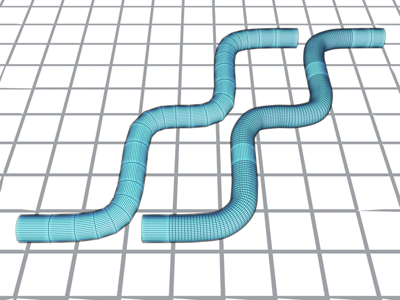
The spline on the left has been normalized.
Interface
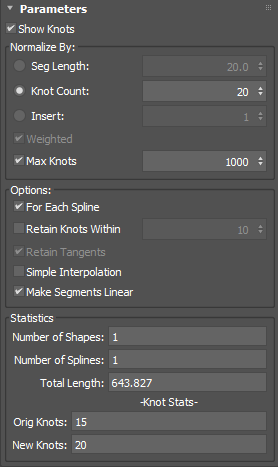
Parameters rollout
Show Knots
Displays knots on the spline.
Normalize By group
Seg Length
Sets the length of the spline's segments in 3ds Max units. The positions of the original vertices are discarded, and vertices are set to regular intervals. Segment length determines how many control points are added. Shorter segments result in more control points, longer segments result in fewer. Default=20.0 units.
Knot Count
Sets an exact number of knots instead of a segment length.
Insert
Inserts a specified number of knots between the existing knots in the shape.
Weighted
Inserts knots based on the average length of the segment rather than evenly distributing them.
Max Knots
When enabled, adjusts the segment length if necessary to prevent very high segment counts.
Options group
For Each Spline
Specifies the number of knots to use for each spline rather than a total across all shapes.
Retain Knots Within
Attempts to keep existing knot locations falling a certain tolerance in 3ds Max units. This option works with both Seg Length and Knot Count normalization methods.
Retain Tangents
Keeps the tangents for retained knots.
Simple Interpolation
Uses knot percentage to interpolate instead of the actual curve length.
Make Segments Straight
Forces the curve type to straight.
Statistics group
Number of Shapes
Shows the total number of shapes being affected.
Number of Splines
Displays the total number of splines being affected.
Total Length
Shows the total length of the created spline.
Orig Knots
Shows the original number of knots in the spline.
New Knots
Show the number of knots after the normalize operation.