Mesh Cleaner
Use the Mesh Cleaner modifier to identify and repair degenerate mesh data that exists on your polygon or triangle mesh object. Degenerate mesh data can lead to problems ranging from geometry manipulations that do not apply or give an expected result, or in more extreme cases can cause instability.
 Modify panel > Make a selection > Modifier List > Object-Space Modifiers > Mesh Cleaner
- Default menu: Create or select an object > Modifiers menu > Retopology Tools > Mesh Cleaner
Degenerate edges and face contain two vertex indices that are identical. Faces therefore have no geometric area, and no normal. Degenerate edges include a zero-linked edge.
Interface
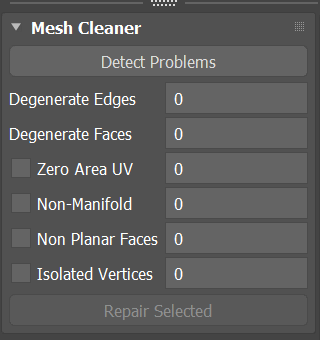
Mesh Cleaner rollout
Detect Problems button
Click to detect problems in your target mesh.
Degenerate Edges
Number of degenerate edges detected.
Degenerate Faces
Number of degenerate faces detected.
Zero Area UV
When enabled, attempts to detect any UV coordinates as part of UV spaces that are too small compared to the size of the mesh volume. When repaired, the detected UV coordinates are detached from those unaffected to scale up the UV area.
Non-Manifold
When enabled, attempts to detect any non-manifold sections that prevent a watertight mesh.
Non-Planar Faces
When enabled, attempts to detect any non-planar faces through triangulation. When repaired, the detected non-planar faces have their UVs shifted to make them planar.
Isolated Vertices
When enabled, attempts to detect any exploded points or isolated vertices that do not hold any mesh data. When repaired, the isolated vertices are deleted.
Repair Selected button
Click to repair all selected mesh problems.
ESC key on Mesh Cleaner modifier operation in case cleanup takes too long.