Trim/Extend Modifier
The Trim/Extend modifier is used primarily to clean up overlapping or open splines in a multi-spline shape so that lines meet at a single point. As with the Fillet/Chamfer modifier, this modifier operates on the splines at the sub-object level in the shape. When applied to a selection of multiple splines, Trim/Extend works as it does on a single spline.
- Select a shape. >
 Modify panel > Modifier List > Object-Space Modifiers > Trim/Extend
 - Default menu: Select a shape. > Modifiers menu > Patch/Spline Editing > Trim/Extend
- Alt menu: Select a shape. > Modifiers menu > Spline > Trim/Extend
To trim, you need intersecting splines. Click the portion of the spline you want to remove. The spline is searched along its length until it hits an intersecting spline, and deleted up to the intersection. If the section intersects at both ends, the entire section is deleted up to the two intersections. If the section is open on one end and intersects at the other, the entire section is deleted up to the intersection and the open end. If the section is not intersected, nothing happens.
To extend, you need an open spline. The end of the spline nearest the picked point is extended until it reaches an intersecting spline. If there is no intersecting spline, nothing happens. Curved splines extend in a direction tangent to the end of the spline. If the end of a spline lies directly on a boundary (an intersecting spline), then it looks for an intersection further along.
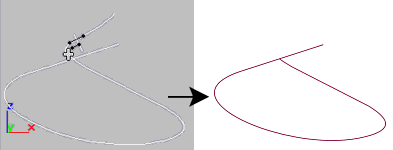
Before and after initial use of Trim
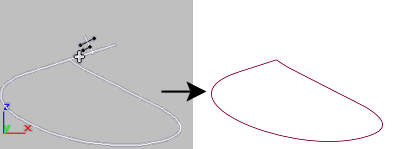
Before and after second use of Trim on above spline
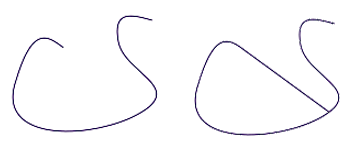
Before and after using Extend
Procedure
Example: To trim a shape using the Trim/Extend modifier:
- Create an open Line shape in the form of roughly concentric overlapping circles.
- Apply the Trim/Extend modifier.
- Click Pick Locations.
- Click the inner spline sections of the concentric shape to trim them away, or click the open spline segment to extend the spline.
Interface
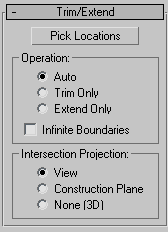
Pick Locations
Click to turn on Pick mode. While in this mode, the mouse cursor changes in appearance when over part of the spline that can be affected by the Trim/Extend modifier. Click to either trim or extend the spline, based on the settings below. Default=Auto.
Operation group
Specifies the type of operation that's performed on the selected spline.
- Auto When this is chosen, a Trim is first looked for and, if not found, an Extend is attempted. In most cases, a Trim will occur when Auto is chosen. An Extend can occur, however, in cases where an open spline exists without intersecting other splines.
- Trim Only Performs only trims. Turn on Pick Locations, and then click the spline section you want to trim.
- Extend Only Performs only extends. Click Pick Locations, and then select the open spline section you want to extend.
Infinite Boundaries
For the purposes of calculating intersections, turn this on to treat open splines as infinite in length. For example, this lets you trim one linear spline against the extended length of another line that it doesn't actually intersect.
Intersection Projection group
These options specify how the Trim and Extend functions determine a valid intersection.
- View Projects the lines onto the active viewport, and judges the intersections accordingly. These are the intersections as you see them in the active viewport.
- Construction Plane Projects the lines onto the current construction plane.
- None (3D) Considers only true intersections as the splines exist in 3D space. They must physically intersect to be considered.