Tessellate Modifier
The Tessellate modifier subdivides faces in the current selection. It's particularly useful for smoothing curved surfaces for rendering, and creating additional mesh resolution for other modifiers to act on. If the stack selection level is Vertex or Edge/Border, Tessellate affects only on faces or polygons that use selected vertices or edges. If no sub-object selection has been passed up the stack, then the entire object is tessellated.
 Modify panel > Make a selection. > Modifier List > Object-Space Modifiers > Tessellate
- Default menu: Make a selection. > Modifiers menu > Mesh Editing > Tessellate
- Alt menu: Make a selection. > Modifiers menu > Geometry (Convert to Mesh) > Tessellate
This modifier lets you tessellate polygonal faces; the tessellation available in an editable mesh does not (it works on faces, even at the Polygon selection level). Also, the Tension setting lets you apply convexity or concavity to the subdivided surface.
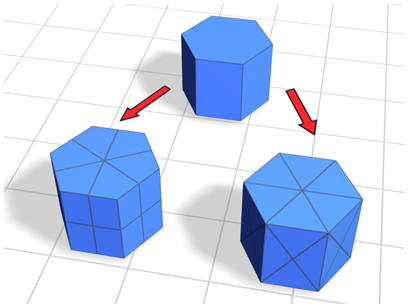
Top: Original mesh object
Lower left: Polygonal tessellation applied to edges
Lower right: Polygonal tessellation applied to polygon centers (Face-Center option)
Interface
Parameters rollout
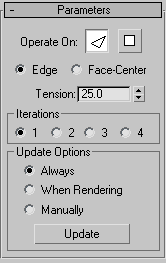
Operate On
Perform the tessellation on the triangular faces or on the polygonal facets (the areas bound by visible edges):
 Faces Treats the selection as a set of triangular faces.
 Polygons Divides the polygonal facets. For example, using the polygonal method on the side of a box results in cross-shaped edges using the Edge method, and X-shaped edges using the Face-Center method.
Edge/Face-Center
- Edge Divides the face or polygon from its center to the middle of each edge. When applied to a triangular face, it also divides unselected faces that share edges with the selected faces.
- Face-Center Divides the face or polygon from the center to the corner vertices.
Tension
Determines whether the new faces are flat, concave, or convex after Edge tessellation. A positive value rounds faces by pushing vertices outward. A negative value creates concave faces by pulling vertices inward. A setting of 0 keeps the faces flat. Also works with the Edge/Polygon method. Default=25.
Iterations group
The number of times to apply the tessellation. For example, setting Iterations to 2 is similar to clicking the Tessellation button twice in an editable mesh, except that you can easily back out at any time while using the Tessellate modifier. To obtain additional iterations, apply another Tessellate modifier.
Update Options group
- Always Tessellation updates whenever the base geometry changes.
- When Rendering Tessellation updates only when the object is rendered.
- Manually Tessellation updates only when you click Update.
Update
Click to update tessellation. Has no effect unless Manually is the active update option.